
Extract the Answers from Filled PDF Forms with an AI Agent
You sent out a fillable PDF — an application, an intake form, a registration — and the filled copies come back one email at a time. Then somebody opens each one and types the answers into a spreadsheet. Template-based parsers can take that over, but only after you've drawn a zone around every field, and they break when the form changes.
A fillable PDF doesn't need parsing at all: every answer is already stored in a named field. Connect an agent to Apdf over MCP and it reads those fields directly — text, ticked boxes, selected options — then turns a stack of returned forms into one table and tells you who left a required answer blank.
Connect your agent to Apdf
Add the MCP server to Claude, or any agent that speaks MCP over HTTP. In Claude Code:
claude mcp add --transport http apdf https://apdf.io/mcp/mainFor Claude Desktop, follow the connection walkthrough. Sign-in runs over OAuth, so there's no API key to paste.
Hand over the returned forms
The forms only need to be reachable by URL — a shared folder, a bucket, the attachment links from your mail tool. Say what you want back:
https://files.fernhill.example/applications/volunteer-application-priya-raman.pdf
https://files.fernhill.example/applications/volunteer-application-tomas-okafor.pdf
https://files.fernhill.example/applications/volunteer-application-hannah-brooks.pdf
https://files.fernhill.example/applications/volunteer-application-leo-fischer.pdf
https://files.fernhill.example/applications/volunteer-application-sam-patel.pdf
Hannah Brooks left the emergency contact's phone empty — it's a required field. Everything else she filled in.
Sam Patel sent a flattened copy: the form has no fields left, so I took his typed answers from the page text. Which boxes he ticked (availability, hours, first aid, consent) can't be read from text — I left those columns empty.
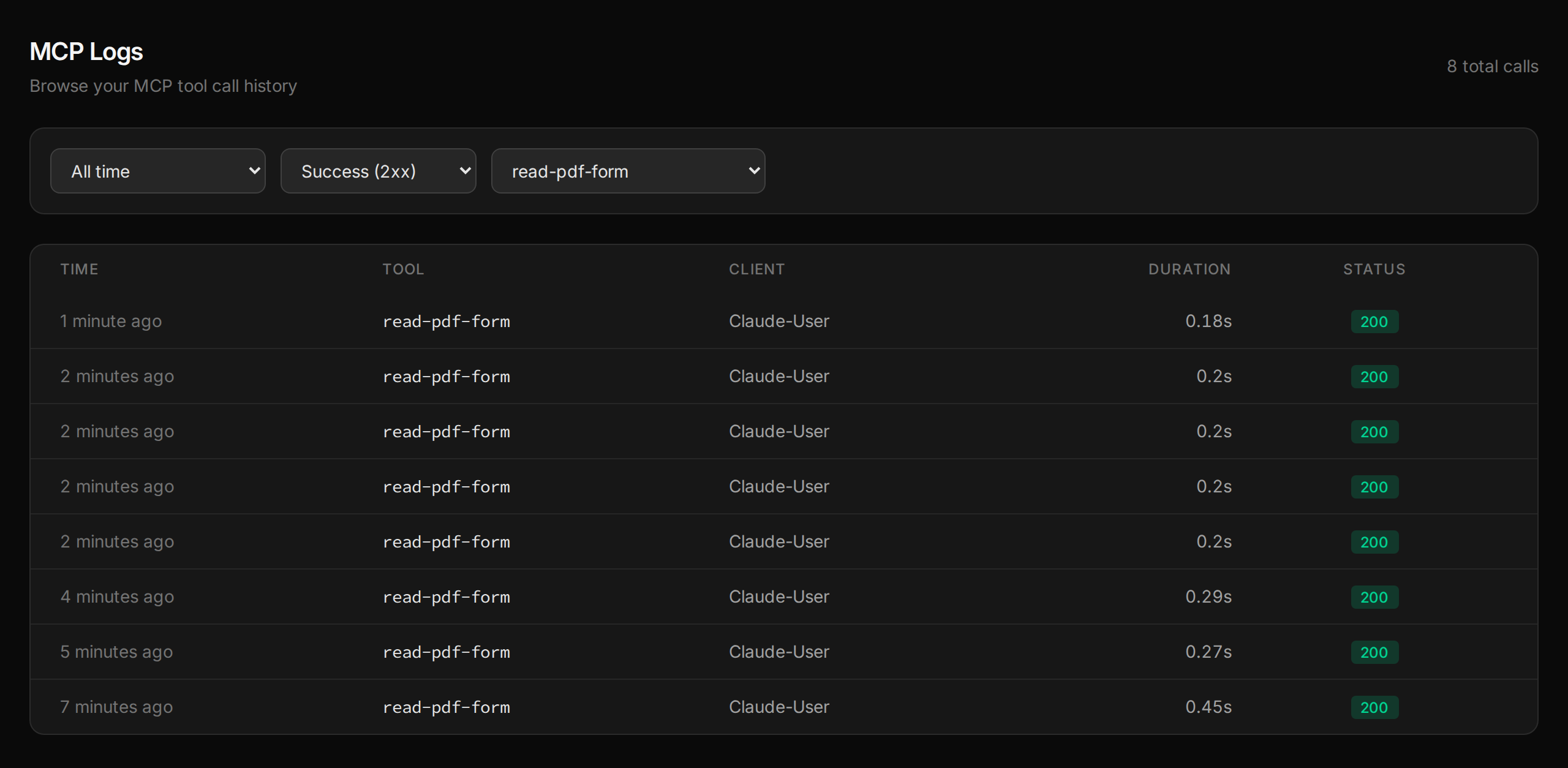
One read-pdf-form call per form; the extra
read-pdf-content was the agent's fallback for the flattened one
(more on that in step 5). Each call shows up in your dashboard under
MCP → Logs:
Check what the agent actually reads
Here's Hannah's returned form. On paper, the empty Phone box under Emergency contact is easy to miss in a pile:
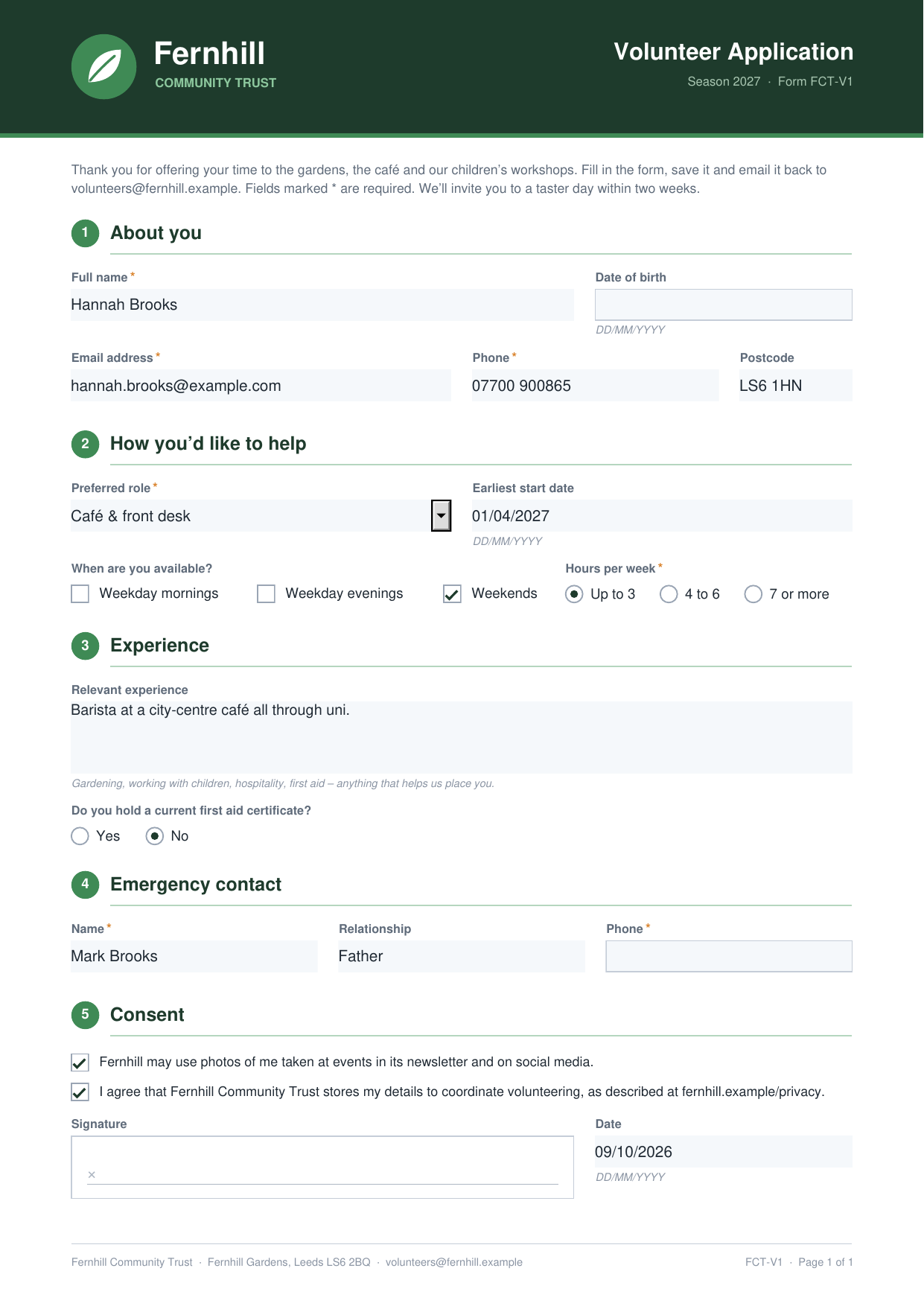
The agent doesn't look at the page, it reads the fields. This is the emergency phone exactly as
read-pdf-form returned it from her form:
{
    "name": "emergency_contact_phone",
    "type": "text",
    "label": "Emergency contact phone",
    "value": "",
    "page": 1,
    "required": true,
    "read_only": false,
    "context": {
        "description": null,
        "position": {
            "x": 390.5,
            "y": 606.1,
            "width": 159.2,
            "height": 20.8
        },
        "visible": true,
        "text": {
            "left": null,
            "right": null,
            "above": "Phone *",
            "below": null,
            "row": null,
            "column": null,
            "inside": null
        }
    }
}
"required": true with an empty
value is the whole check. The other field types come back just
as directly:
- a single checkbox as
trueorfalse— no guessing whether a tick mark is a tick; - a radio group or dropdown as the selected option (
"Up to 3"), ornullwhen nothing is selected; - dates as the form displays them (
"09/10/2026") — which is why the prompt asked for YYYY-MM-DD.
Get one table back
The CSV the agent built from the field values:
name,email,phone,role,start_date,availability,hours_per_week,first_aid,emergency_contact,emergency_phone,photo_consent,missing_required
Priya Raman,priya.raman@example.com,07700 900127,Children’s workshops,2027-03-06,weekday evenings; weekends,4 to 6,yes,Arjun Raman (Brother),07700 900583,yes,
Tomás Okafor,tomas.okafor@example.com,07700 900342,Garden crew,2027-03-01,weekday mornings; weekends,7 or more,no,Grace Okafor (Wife),07700 900771,no,
Hannah Brooks,hannah.brooks@example.com,07700 900865,Café & front desk,2027-04-01,weekends,Up to 3,no,Mark Brooks (Father),,yes,emergency_contact_phone
Leo Fischer,leo.fischer@example.com,07700 900219,Events & festivals,2027-03-13,weekday evenings,4 to 6,yes,Anna Fischer (Mother),07700 900904,yes,
Sam Patel,sam.patel@example.com,07700 900456,Garden crew,2027-03-01,,,,Ravi Patel (Father),07700 900612,,flattened form: tick boxes unreadable
Once the answers are in the conversation, follow-up questions don't cost another tool call:
Catch flattened forms
Some applicants “print to PDF” or flatten the form before sending it back. The answers
are then part of the page, and the form has no fields left. For Sam's copy,
read-pdf-form returned exactly that:
{
    "fields": [],
    "pages": [
        {
            "page": 1,
            "width": 595.3,
            "height": 841.9,
            "has_text": true
        }
    ]
}
An empty field list on a page that has text is the signal. The agent fell back to
read-pdf-content, which returns the page text: typed answers like
his name, phone and emergency contact are in there, but a tick or a selected radio button isn't
text, so “Weekends” and “Up to 3” appear whether he chose them or not.
The reliable fix is to ask for the fillable copy — or to stop collecting forms by email
altogether.
Where to go from here
Skip the inbox next time — or send the forms out pre-filled.
Related tutorials
Fill Out Any PDF Form by Asking Claude
Chat assistants can tell you what goes into a PDF form, but they can't write it in. Connect Claude to Apdf over MCP and it sees the form as numbered boxes, matches your plain-language details to the right fields and dropdown options, and hands back the filled PDF — flattened if you want it locked.
Prefill PDF Forms from Google Sheets with n8n
Each new row in Google Sheets fills your existing PDF form through the Apdf n8n node, optionally flattened, then the PDF is saved to Google Drive and emailed to the member. No code, no template builder — and the API logs show exactly why a row was rejected.
Get PDF Form Field Names and Values in Python
Python form libraries hand you raw PDF objects to decode. Send the form URL to the Apdf API instead and get every field as JSON — name, value in a Python-friendly shape, options, required flag and the question printed next to it — then turn a folder of filled rental applications into a CSV that flags missing answers.
Your code made the PDF.
Then it went dark.
Opened, read, signed or ignored — you never see any of it. Send the PDFs you generate as personal links, and every open, page read, comment and signature comes back to your software as a webhook. Need it signed? Same link. Same account, same API key, one more call.
API · Webhook · MCP