
Fill Out Any PDF Form by Asking Claude
Upload a PDF form to a chat assistant and you get good advice: what goes into which box, how to phrase the income line. What you don't get is a filled form. The assistant can't write into the PDF's fields, so you end up copying every answer across by hand — which is the part you wanted to skip.
Connect Claude to Apdf over MCP and the missing step is there. Claude looks at the form, works out which box is which field, writes your answers into the real form fields and gives you the filled PDF back. You type your details once, in plain language.
Connect Claude to Apdf
The MCP server is one OAuth-signed endpoint — no API keys to paste:
https://apdf.io/mcp/mainIn Claude Desktop add it as a custom connector (the connection walkthrough has every click). In Claude Code it's one line:
claude mcp add --transport http apdf https://apdf.io/mcp/mainHand Claude the form and your details
Paste the link to the form — any publicly reachable URL — and write your details the way you'd tell a friend. No field names, no particular order:
https://harbourline.example/forms/rental-application.pdf
I'm Elena Marsh, born 12 March 1991, elena.marsh@example.com, 07700 900418. I've lived at Flat 3, 27 Kingsdown Parade, Bristol BS6 5UE for two years. It's for flat HL-2387, moving in on 1 December, 12-month lease, my partner and me plus our cat — and yes to a parking space. I'm a Senior UX Designer at Brightwater Studio, permanent, £3,250 a month after tax. Tick the consent boxes and date it today.
One thing I can't do is sign: the Signature box is a signature field, so open the PDF and sign it in your PDF reader. Download link below — it's valid for one hour.
Three tool calls did the work. The next two steps show what each one returned.
See the form the way Claude sees it
Field names in PDFs are often cryptic, and a label printed next to a box says nothing about
which field the box belongs to. So the agent starts with
visualize-pdf-form: it renders the page with a numbered box on
every field to fill, and Claude opens the image. This is the real image it got back:
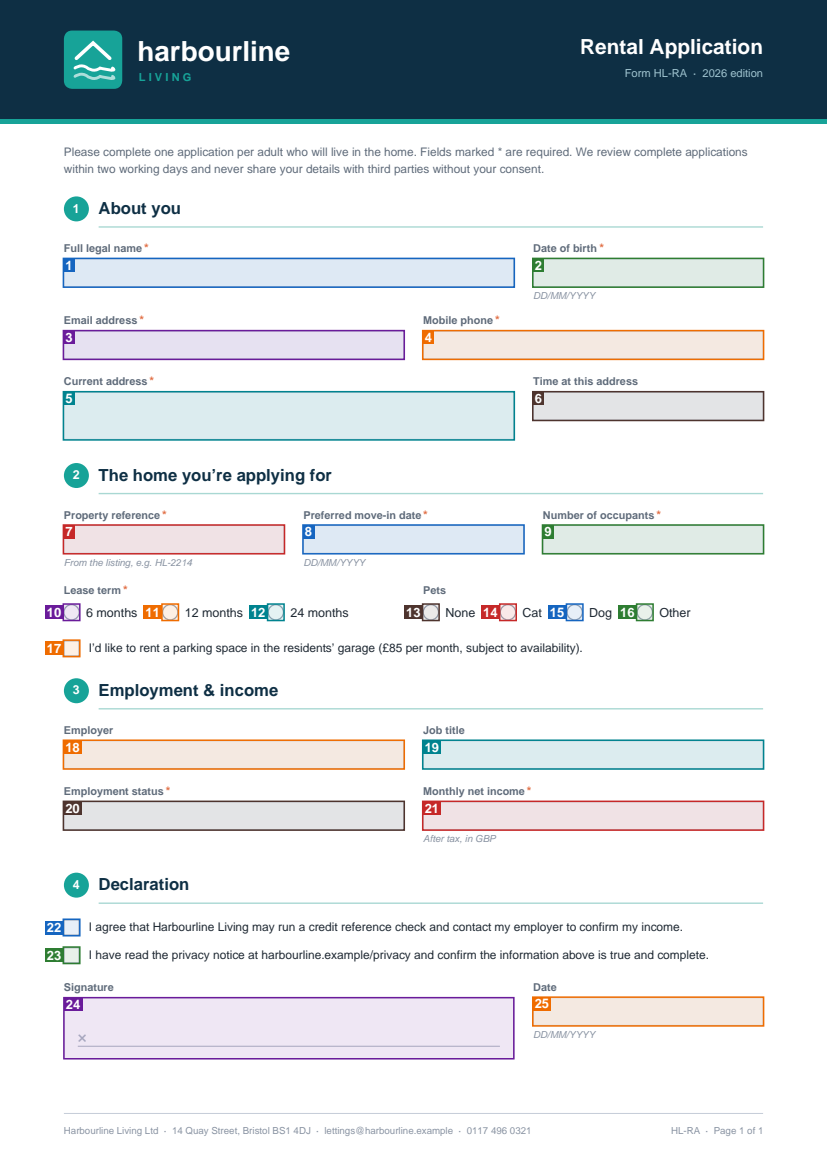
Next to the image comes the legend: which field each number is. Radio buttons and checkboxes
get one number per option, with the option value to send:
{
    "pages": [
        {
            "page": 1,
            "file": "https://apdf-files.s3.eu-central-1.amazonaws.com/628bde906ad47978a7228-1.png",
            "expiration": "2026-10-18T08:47:04.874473Z",
            "fields": [
                { "number": 1, "name": "full_name", "type": "text" },
                { "number": 2, "name": "date_of_birth", "type": "text" },
                { "number": 3, "name": "email", "type": "text" },
                { "number": 4, "name": "phone", "type": "text" },
                { "number": 5, "name": "current_address", "type": "textarea" },
                { "number": 6, "name": "time_at_address", "type": "combobox" },
                { "number": 7, "name": "property_reference", "type": "text" },
                { "number": 8, "name": "move_in_date", "type": "text" },
                { "number": 9, "name": "occupants", "type": "combobox" },
                { "number": 10, "name": "lease_term", "type": "radio", "option": "6 months" },
                { "number": 11, "name": "lease_term", "type": "radio", "option": "12 months" },
                { "number": 12, "name": "lease_term", "type": "radio", "option": "24 months" },
                { "number": 13, "name": "pets", "type": "radio", "option": "None" },
                { "number": 14, "name": "pets", "type": "radio", "option": "Cat" },
                { "number": 15, "name": "pets", "type": "radio", "option": "Dog" },
                { "number": 16, "name": "pets", "type": "radio", "option": "Other" },
                { "number": 17, "name": "parking_space", "type": "checkbox", "option": "Yes" },
                { "number": 18, "name": "employer", "type": "text" },
                { "number": 19, "name": "job_title", "type": "text" },
                { "number": 20, "name": "employment_status", "type": "combobox" },
                { "number": 21, "name": "monthly_income", "type": "text" },
                { "number": 22, "name": "consent_credit_check", "type": "checkbox", "option": "Yes" },
                { "number": 23, "name": "consent_privacy", "type": "checkbox", "option": "Yes" },
                { "number": 24, "name": "applicant_signature", "type": "signature" },
                { "number": 25, "name": "signed_on", "type": "text" }
            ]
        }
    ]
}
Box 24 is the signature field: it's marked so Claude knows it exists, but it can't be filled. Read-only fields and buttons aren't marked at all, and fields the form only shows on demand get a dashed box.
The image tells Claude where a field is, not what a dropdown accepts. For that it
called read-pdf-form, which lists every field with its options,
whether it's required and the text printed around it. Here's the occupants dropdown from that
list:
{
    "name": "occupants",
    "type": "combobox",
    "label": "Number of occupants, including children",
    "value": null,
    "page": 1,
    "required": true,
    "read_only": false,
    "options": [
        "1",
        "2",
        "3",
        "4",
        "5 or more"
    ],
    "editable": false,
    "context": {
        "description": null,
        "position": {
            "x": 390.5,
            "y": 378.1,
            "width": 159.2,
            "height": 20.8
        },
        "visible": true,
        "text": {
            "left": null,
            "right": null,
            "above": "Number of occupants *",
            "below": null,
            "row": null,
            "column": null,
            "inside": null
        }
    }
}
“My partner and me” has to become "2", exactly as
the option is spelled — a dropdown that isn't editable takes nothing else. That's why the
agent reads the options before it fills.
Get the filled PDF back
With the map in hand, Claude sent one fill-pdf-form call: each
field by its name, text for text fields, true for checkboxes,
the exact option for radios and dropdowns. These are the arguments it sent:
{
    "file": "https://harbourline.example/forms/rental-application.pdf",
    "fields": [
        { "name": "full_name", "value": "Elena Marsh" },
        { "name": "date_of_birth", "value": "1991-03-12" },
        { "name": "email", "value": "elena.marsh@example.com" },
        { "name": "phone", "value": "07700 900418" },
        { "name": "current_address", "value": "Flat 3, 27 Kingsdown Parade\nBristol BS6 5UE" },
        { "name": "time_at_address", "value": "1 to 3 years" },
        { "name": "property_reference", "value": "HL-2387" },
        { "name": "move_in_date", "value": "2026-12-01" },
        { "name": "occupants", "value": "2" },
        { "name": "lease_term", "value": "12 months" },
        { "name": "pets", "value": "Cat" },
        { "name": "parking_space", "value": true },
        { "name": "employer", "value": "Brightwater Studio" },
        { "name": "job_title", "value": "Senior UX Designer" },
        { "name": "employment_status", "value": "Permanent" },
        { "name": "monthly_income", "value": "£3,250" },
        { "name": "consent_credit_check", "value": true },
        { "name": "consent_privacy", "value": true },
        { "name": "signed_on", "value": "2026-10-18" }
    ]
}
And the result:
{
    "file": "https://apdf-files.s3.eu-central-1.amazonaws.com/d42a4f9f6ad4797a32f2e.pdf",
    "expiration": "2026-10-18T08:47:06.820556Z",
    "calculations": {
        "updated": [],
        "unsupported": []
    }
}
Opened, the PDF is a normal filled form — the values sit in the fields, so the landlord can still read them out or you can correct one in any PDF reader:
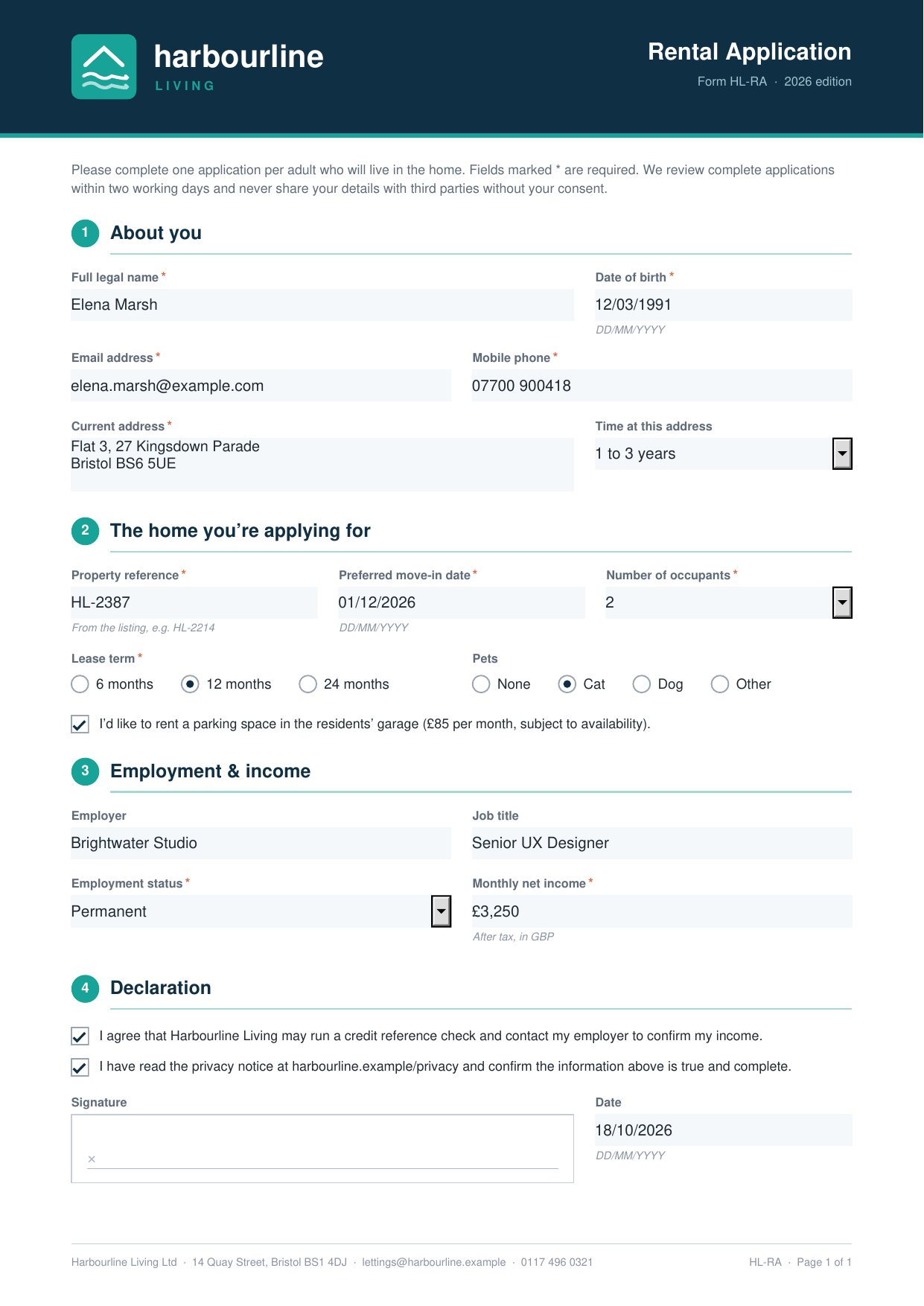
Two details worth knowing. Claude sent the dates as YYYY-MM-DD,
and because these date fields carry a display format, they show up as 12/03/1991 and 01/12/2026.
And calculations is empty because this form has no totals
— on an order form or expense claim, calculated fields are updated after filling and
listed there.
Lock the form before you send it
A filled form can still be edited by whoever opens it. If you'd rather send a copy nobody can change, ask for it flattened:
Same call, same fields, plus "flatten": true:
{
    "file": "https://apdf-files.s3.eu-central-1.amazonaws.com/8878e16a6ad4798a657c0.pdf",
    "expiration": "2026-10-18T08:47:23.074032Z",
    "calculations": {
        "updated": [],
        "unsupported": []
    }
}
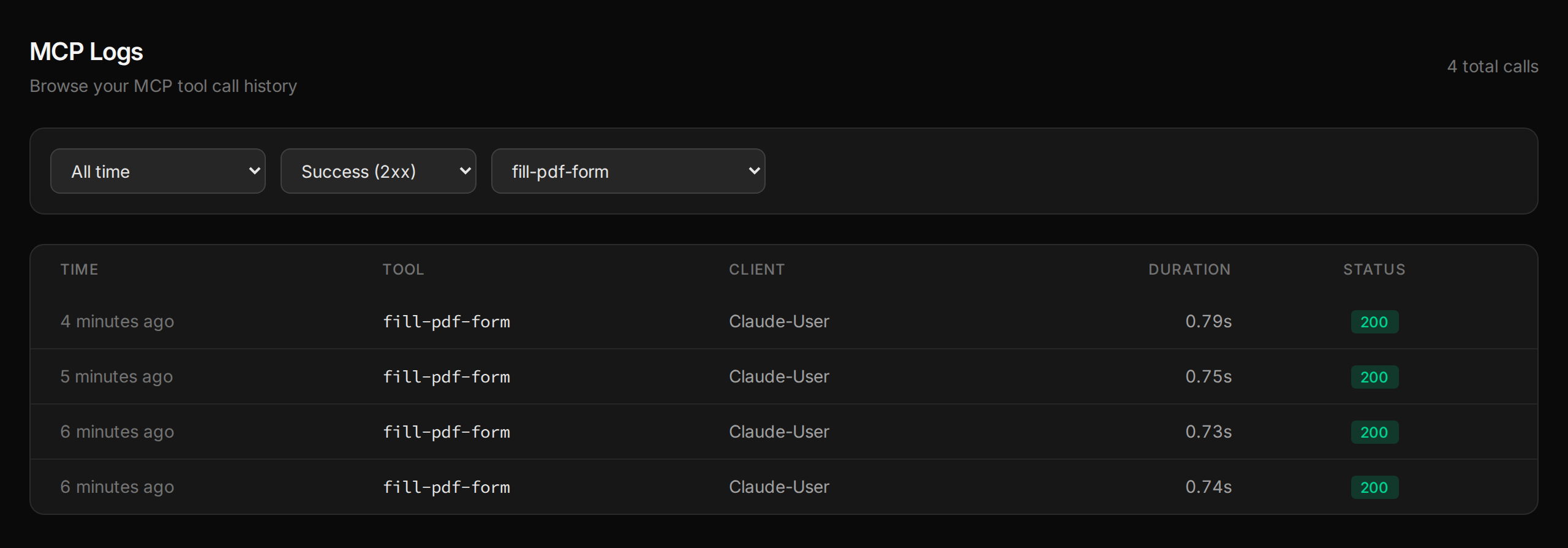
Every tool call Claude makes shows up in your dashboard under MCP → Logs, with its duration and status — here filtered to the fills from this conversation:
Where to go from here
The same tools work outside the chat — and the same connection sends, tracks and signs the result.
Related tutorials
Get PDF Form Field Names and Values in Python
Python form libraries hand you raw PDF objects to decode. Send the form URL to the Apdf API instead and get every field as JSON — name, value in a Python-friendly shape, options, required flag and the question printed next to it — then turn a folder of filled rental applications into a CSV that flags missing answers.
Turn Scanned Invoices into Structured Data with an Agent
OCR reads tabular scans in scrambled order — the wall every regex parser dies against, and exactly where the agent shines: it reassembles vendor, number, date and line items from the mess, cross-checks the sums against each stated total, and flags mismatches for human eyes instead of your books.
Search a PDF From Your Editor
The integration spec is a PDF and your questions arrive mid-function. With the editor connected over MCP, 'what's the retry policy?' comes back with the exact line and page — and a regex search turns 'list every error code' into one call with three cited matches.
Your code made the PDF.
Then it went dark.
Opened, read, signed or ignored — you never see any of it. Send the PDFs you generate as personal links, and every open, page read, comment and signature comes back to your software as a webhook. Need it signed? Same link. Same account, same API key, one more call.
API · Webhook · MCP