
How to Make a PDF Form Fillable Online and Collect the Submissions
You have a PDF form — a vendor intake, a client questionnaire, a field report. Today it goes out as an email attachment, and what comes back is a mess: printed, scanned, half-filled copies whose answers someone re-types into a spreadsheet.
The usual fix is rebuilding the whole document in a form-builder tool. But your PDF already has the fields. In this tutorial you'll keep it exactly as it is: share it as a link that's fillable in the browser, and collect every submission as typed, recipient-attributed data.
Put your fillable PDF behind a tracking link
Upload your PDF in the Apdf dashboard or via the API. Any standard PDF form fields work — text inputs, radio groups, checkboxes, multi-line text. The hosted viewer renders them fillable in any browser, no install for your recipients.
curl -X POST https://apdf.io/api/docs \
  -H "Authorization: Bearer YOUR_API_TOKEN" \
  -H "Accept: application/json" \
  -d file="https://your-server.com/vendor-intake-form.pdf" \
  -d name="Vendor Intake Form"
{
"data": {
"doc_id": "ebded-b6c48-000c5",
"viewer_url": "https://docs.apdf.io/studio/ebded-b6c48-000c5",
"file_url": "https://apdf-files.s3.eu-central-1.amazonaws.com/docs/202607/3911b2126a607fe1f287d.pdf",
"name": "Vendor Intake Form",
"file_size": 8159,
"file_pages": 1,
"is_public": false,
"created_at": "2026-07-22T08:45:12.000000Z",
"archived_at": null
}
}Send each recipient their own link
Mint a recipient link per person instead of sharing the document URL. Each recipient gets a tokenized URL, so every submission comes back already attributed — no “who sent this scan?” detective work.
curl -X POST https://apdf.io/api/docs/ebded-b6c48-000c5/links \
  -H "Authorization: Bearer YOUR_API_TOKEN" \
  -H "Accept: application/json" \
  -d name="Dana Kim" \
  -d email="dana@vendorco.example"
{
"data": {
"token": "GhMG25wO",
"name": "Dana Kim",
"email": "dana@vendorco.example",
"url": "https://docs.apdf.io/studio/ebded-b6c48-000c5?v=GhMG25wO",
"is_active": true,
"last_viewed_at": null,
"created_at": "2026-07-22T08:45:48.000000Z"
}
}
Send that url to Dana. She opens it in her browser,
fills the fields right in the PDF, and hits Submit — that's
her entire experience. No account, no app, no printout.
Watch the submissions arrive
Every submission lands in your dashboard, typed and attributed. Open your document under Documents and switch to the Form Submits tab:
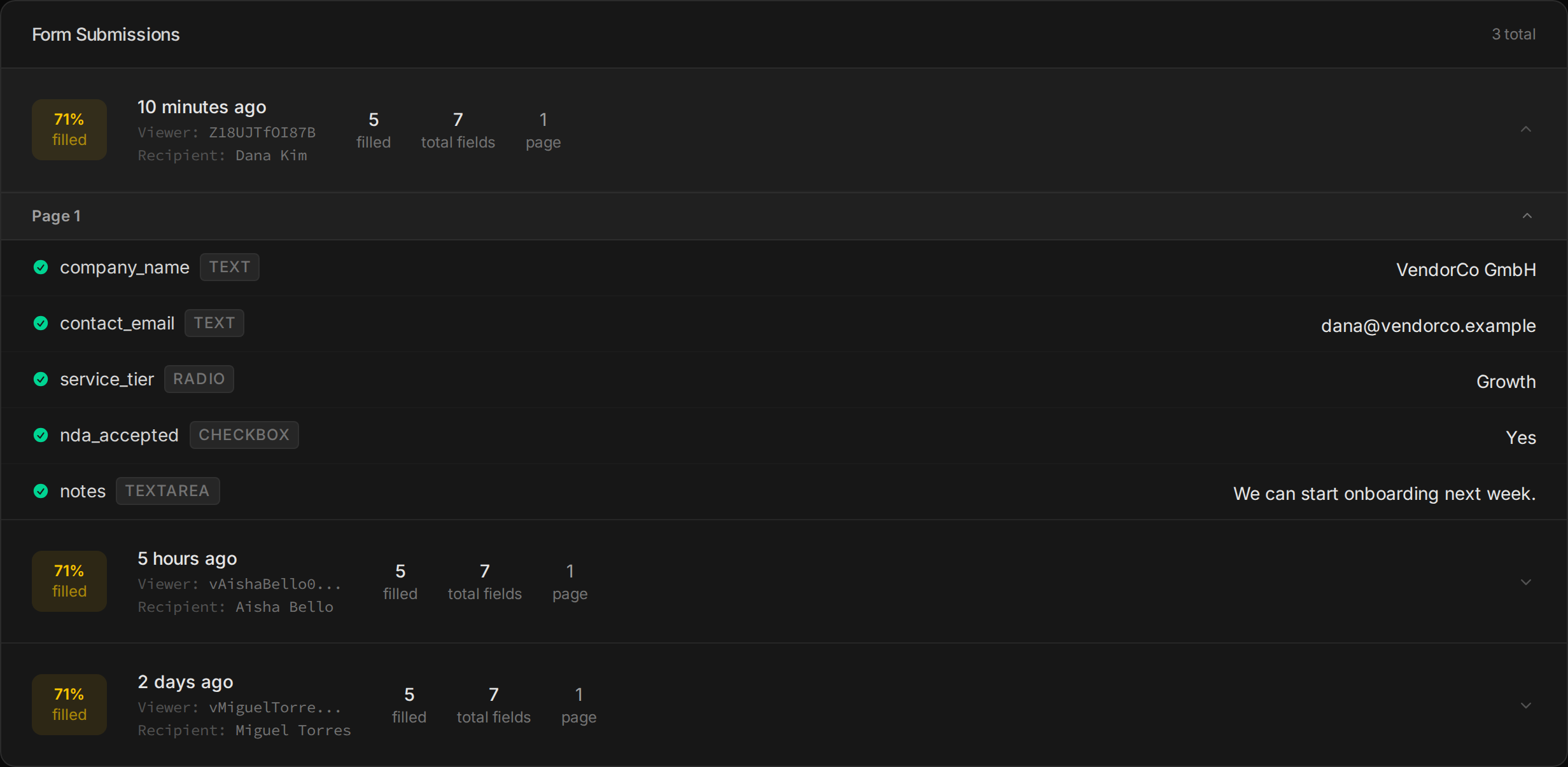
The same data is available over the API — each submission carries the recipient and every field with its type, page and value:
curl https://apdf.io/api/docs/ebded-b6c48-000c5/form-submissions \
  -H "Authorization: Bearer YOUR_API_TOKEN" \
  -H "Accept: application/json"
{
"data": [
{
"doc_id": "ebded-b6c48-000c5",
"creator_id": "Z18UJTfOI87B",
"recipient": {
"name": "Dana Kim",
"email": "dana@vendorco.example"
},
"fields": [
{ "id": "10R", "name": "company_name", "page": 1, "type": "text", "value": "VendorCo GmbH" },
{ "id": "14R", "name": "contact_email", "page": 1, "type": "text", "value": "dana@vendorco.example" },
{ "id": "17R", "name": "service_tier", "page": 1, "type": "radio", "value": false, "checked": false, "exportValue": "Starter" },
{ "id": "22R", "name": "service_tier", "page": 1, "type": "radio", "value": true, "checked": true, "exportValue": "Growth" },
{ "id": "27R", "name": "service_tier", "page": 1, "type": "radio", "value": false, "checked": false, "exportValue": "Enterprise" },
{ "id": "33R", "name": "nda_accepted", "page": 1, "type": "checkbox", "value": true, "checked": true, "exportValue": "Yes" },
{ "id": "39R", "name": "notes", "page": 1, "type": "textarea", "value": "We can start onboarding next week." }
],
"created_at": "2026-07-22T08:46:02.000000Z",
"updated_at": "2026-07-22T08:46:02.000000Z"
}
]
}
Note how choice fields work: every radio option is reported with its
exportValue, and the picked one is
checked. No parsing, no flattened text blob.
Push every submission to your webhook
Checking a dashboard is fine; not having to check it is better. Wire a when→then automation so each submission POSTs itself to your endpoint the moment it happens:
- Go to Automations in the dashboard and click New Automation.
- Under “When this happens…” pick Form Submitted as the trigger. Scope it to all documents or just this one.
- Under “Then do this…” paste your Webhook URL and save.
From now on, each submission arrives at your endpoint looking like this:
{
    "automation": {
        "id": "57a30-8b123-ab852",
        "name": "Forward form submissions"
    },
    "document": {
        "doc_id": "ebded-b6c48-000c5",
        "name": "Vendor Intake Form",
        "viewer_url": "https://docs.apdf.io/studio/ebded-b6c48-000c5",
        "file_pages": 1
    },
    "trigger": {
        "matched_event": "form:submit",
        "conditions_evaluated": false
    },
    "event": {
        "session_id": "ky4NcNa69ILv06To",
        "viewer_id": "Z18UJTfOI87B",
        "recipient": {
            "name": "Dana Kim",
            "email": "dana@vendorco.example"
        },
        "data": {
            "fields": [
                { "id": "10R", "name": "company_name", "type": "text", "value": "VendorCo GmbH", "page": 1 },
                { "id": "14R", "name": "contact_email", "type": "text", "value": "dana@vendorco.example", "page": 1 },
                { "id": "17R", "name": "service_tier", "type": "radio", "value": false, "page": 1, "exportValue": "Starter", "checked": false },
                { "id": "22R", "name": "service_tier", "type": "radio", "value": true, "page": 1, "exportValue": "Growth", "checked": true },
                { "id": "27R", "name": "service_tier", "type": "radio", "value": false, "page": 1, "exportValue": "Enterprise", "checked": false },
                { "id": "33R", "name": "nda_accepted", "type": "checkbox", "value": true, "page": 1, "exportValue": "Yes", "checked": true },
                { "id": "39R", "name": "notes", "type": "textarea", "value": "We can start onboarding next week.", "page": 1 }
            ]
        }
    },
    "session": {
        "total_duration_ms": 4900,
        "pages_viewed": 1,
        "completion_rate": 100
    },
    "timestamp": "2026-07-22T08:46:02+00:00"
}Handle the submission in PHP
A complete receiver in one file — it collapses the fields into a clean
name => value array (keeping only the checked
option of each radio and checkbox) and hands the result to whatever comes next
in your stack:
<?php

// Receive a form submission webhook and hand it to your CRM
$payload = json_decode(file_get_contents('php://input'), true);

$recipient = $payload['event']['recipient'] ?? null;
$values = collect_fields($payload['event']['data']['fields']);

// Every submitted value, keyed by field name — checked radios/checkboxes only
function collect_fields(array $fields): array
{
    $values = [];

    foreach ($fields as $field) {
        if (in_array($field['type'], ['radio', 'checkbox'], true)) {
            if ($field['checked']) {
                $values[$field['name']] = $field['exportValue'];
            }
            continue;
        }

        $values[$field['name']] = $field['value'];
    }

    return $values;
}

// From here it's your world: create the CRM record, notify the team, ...
error_log(sprintf(
    'New vendor intake from %s <%s>: %s (%s tier)',
    $recipient['name'] ?? 'Unknown',
    $recipient['email'] ?? '-',
    $values['company_name'] ?? '?',
    $values['service_tier'] ?? '?',
));

http_response_code(200);
echo json_encode(['received' => true]);
php -S 0.0.0.0:8080 webhook.phpSubmit the form once more and your log shows the whole story in one line:
New vendor intake from Dana Kim <dana@vendorco.example>: VendorCo GmbH (Growth tier)Where to go from here
The submission is one signal — the same document streams every reader event.
Related tutorials
Track Who Read the Documents They Were Required to Read
When the auditor asks who read the safety policy, 'we emailed it' is a shrug. Per-person links measure the reading, an in-document acknowledgement checkbox collects the signature, and one script joins them into a defensible roster: read 100% and acknowledged, read but unsigned, never opened.
Onboard Clients with a Tracked Welcome Packet and Intake Form
Welcome PDF here, form tool there, chase emails everywhere — or one tracked link: the packet with the intake form as its last page. The client reads, fills and submits in a single visit, and both halves come back attributed — the answers machine-readable, the read confirmed page by page.
Handle Document Webhooks Reliably
Webhook demos end at 200 OK; production starts there. One plain-JDK Java file covers the three duties the delivery contract implies — ack fast (10s timeout, no retries), dedupe durably (state that survives restarts), and reconcile against the execution log, which carries every failed delivery's full payload for safe replay.