
Prefill PDF Forms from Google Sheets with n8n
The data is already in a spreadsheet, the PDF form already exists — and someone still copies each row into the form by hand. The usual workarounds hurt too: rebuild the form as a Google Docs template and export it (so it's no longer the original form), or dig out every field's exact name in a separate inspector tool before you can map anything.
You don't need either. In this tutorial an n8n workflow fills the PDF form you already have the moment a row lands in Google Sheets, then files the PDF in Google Drive and emails it — with the Apdf node and a few clicks.
Match the sheet columns to the form fields
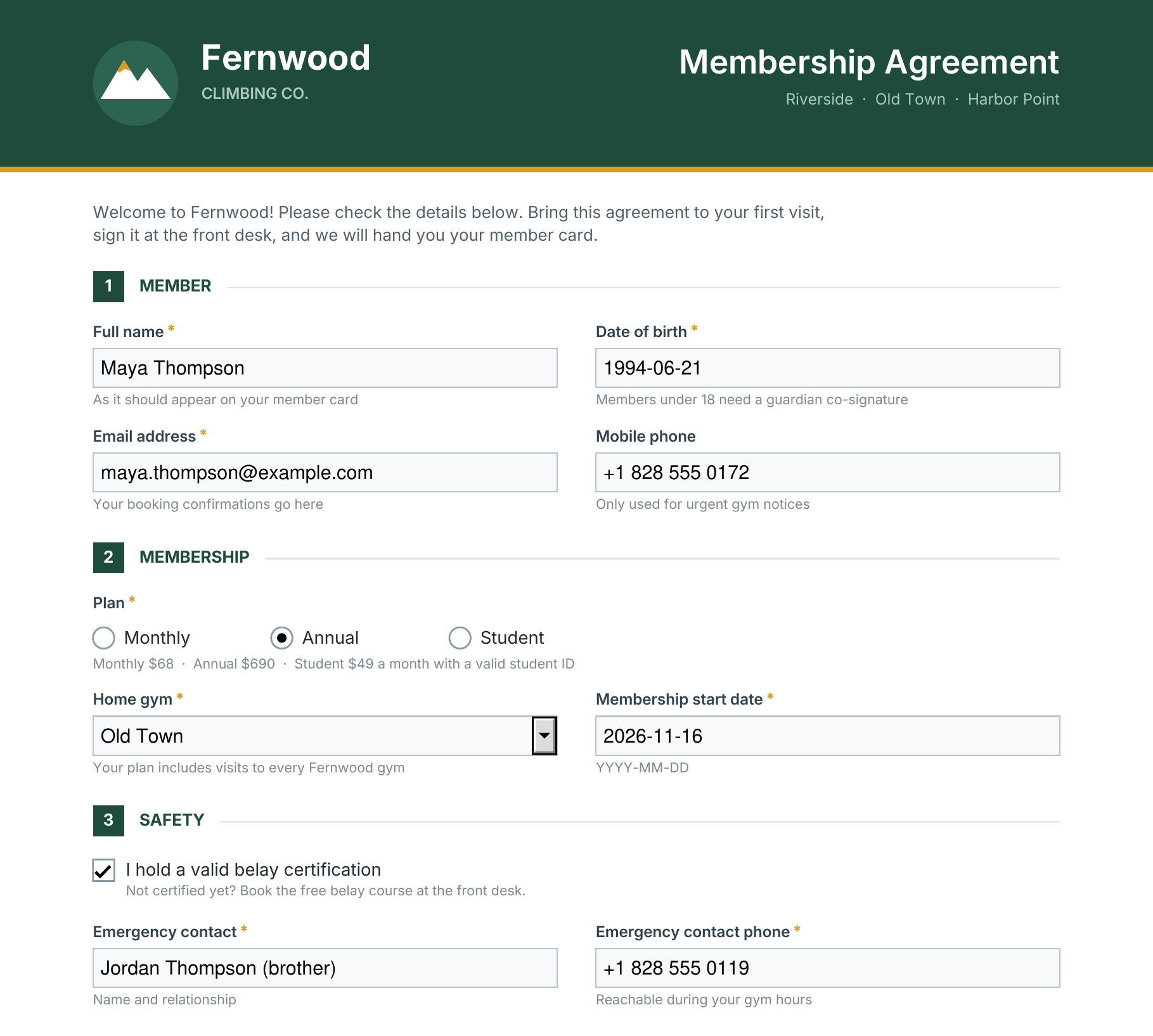
The form is Fernwood Climbing's one-page membership agreement: text fields, a radio group for the
plan, a dropdown for the home gym and two checkboxes. It sits at a public URL, for example
https://files.fernwoodclimbing.example/forms/membership-agreement.pdf.
To fill a field you need its name. Install the Apdf n8n node
(@apdf/n8n-nodes-apdf), add an Apdf node with
Resource PDF and Operation Read Form,
paste the form's address as File URL and run the step once. It lists every field with
its name, type, label and options. For this form, that gives the sheet its columns:
| Sheet column | Field name | Takes |
|---|---|---|
| Name | member_name | text |
| Date of birth | date_of_birth | text |
| text | ||
| Phone | phone | text |
| Plan | membership_plan | radio: Monthly, Annual, Student |
| Home gym | home_gym | dropdown: Riverside, Old Town, Harbor Point |
| Start date | start_date | text |
| Belay certified | belay_certified | checkbox: TRUE or FALSE |
| Emergency contact | emergency_contact | text |
| Emergency phone | emergency_phone | text |
| Newsletter | newsletter | checkbox: TRUE or FALSE |
Create the sheet with these headers in the first row. Text fields take whatever the cell shows,
so write dates the way they should appear on the form. The checkbox columns can be Google Sheets
checkboxes: their TRUE and FALSE
tick and untick the boxes.
Start the workflow on every new row
- In a new n8n workflow, add the Google Sheets Trigger and connect your Google account.
- Pick the spreadsheet under Document and the tab under Sheet.
- Set Trigger On to Row Added. Add a test row and fetch it, so the next nodes can map its columns.
Each new row reaches the next node as one item, keyed by the headers:
{{ $json.Name }} is the member's name,
{{ $json['Home gym'] }} their gym.
Fill the form with the Apdf node
- In the Apdf dashboard, open API → Tokens and click Create token. In n8n, create Apdf API credentials and paste it as the API Token.
- Add an Apdf node after the trigger: Resource PDF, Operation Fill Form, and the form's address as File URL.
-
Under Fields, click Add field once per column. Enter the field name as Name and drag the matching column into Value, for example
member_name→{{ $json.Name }}andhome_gym→{{ $json['Home gym'] }}. - Under Options, click Add option and turn on Flatten if the PDF is a final record.
For Maya Thompson's row, this is the request the node sends:
{
    "file": "https://files.fernwoodclimbing.example/forms/membership-agreement.pdf",
    "fields": [
        { "name": "member_name", "value": "Maya Thompson" },
        { "name": "date_of_birth", "value": "1994-06-21" },
        { "name": "email", "value": "maya.thompson@example.com" },
        { "name": "phone", "value": "+1 828 555 0172" },
        { "name": "membership_plan", "value": "Annual" },
        { "name": "home_gym", "value": "Old Town" },
        { "name": "start_date", "value": "2026-11-16" },
        { "name": "belay_certified", "value": "TRUE" },
        { "name": "emergency_contact", "value": "Jordan Thompson (brother)" },
        { "name": "emergency_phone", "value": "+1 828 555 0119" },
        { "name": "newsletter", "value": "FALSE" }
    ],
    "flatten": true
}
And the node's output — a link to the filled PDF:
{
    "file": "https://apdf-files.s3.eu-central-1.amazonaws.com/01d538356ad47a98e6acc.pdf",
    "expiration": "2026-10-18T08:51:53.601747Z",
    "calculations": {
        "updated": [],
        "unsupported": []
    }
}
Fields you leave out keep their value, and calculated fields such as totals are updated after
filling (calculations lists them; this form has none).
Flatten merges the filled fields into the page: the result looks the same but
can't be edited anymore. Leave it off when the recipient still has fields to complete.
Save the PDF to Drive and email it
The Apdf node returns a link, not the file. Download it into the workflow, then hand the file to Drive and Gmail:
-
Add an HTTP Request node: Method GET, URL
{{ $json.file }}. Under Options, add Response and set Response Format to File. The PDF lands in the binary field named under Put Output in Field,databy default. -
Connect a Google Drive node with Upload a file: Input Data Field Name
data, File Namemembership-agreement-{{ $('Google Sheets Trigger').item.json.Name }}.pdf, and the members folder as Parent Folder. -
Connect a Gmail node to the HTTP Request node as well, with Send: To
{{ $('Google Sheets Trigger').item.json.Email }}, a Subject and Message, and under Options → Attachments the Attachment Field Namedata. - Activate the workflow. Every row added from now on gets its own agreement.
Drive and Gmail both hang off the HTTP Request node, so each of them gets the file.
Download it in the same run, as this workflow does: the link in
file stops working after 60
minutes (see expiration), so don't store it in the sheet.
Find out why a row was rejected
When a row carries a value the form doesn't accept, the fill is rejected and nothing is filled. Every call the node makes is listed in the Apdf dashboard under API → Logs — give the n8n workflow its own token and filter the log by it. A rejected call expands to its Response Content, which names the field and the options it takes:
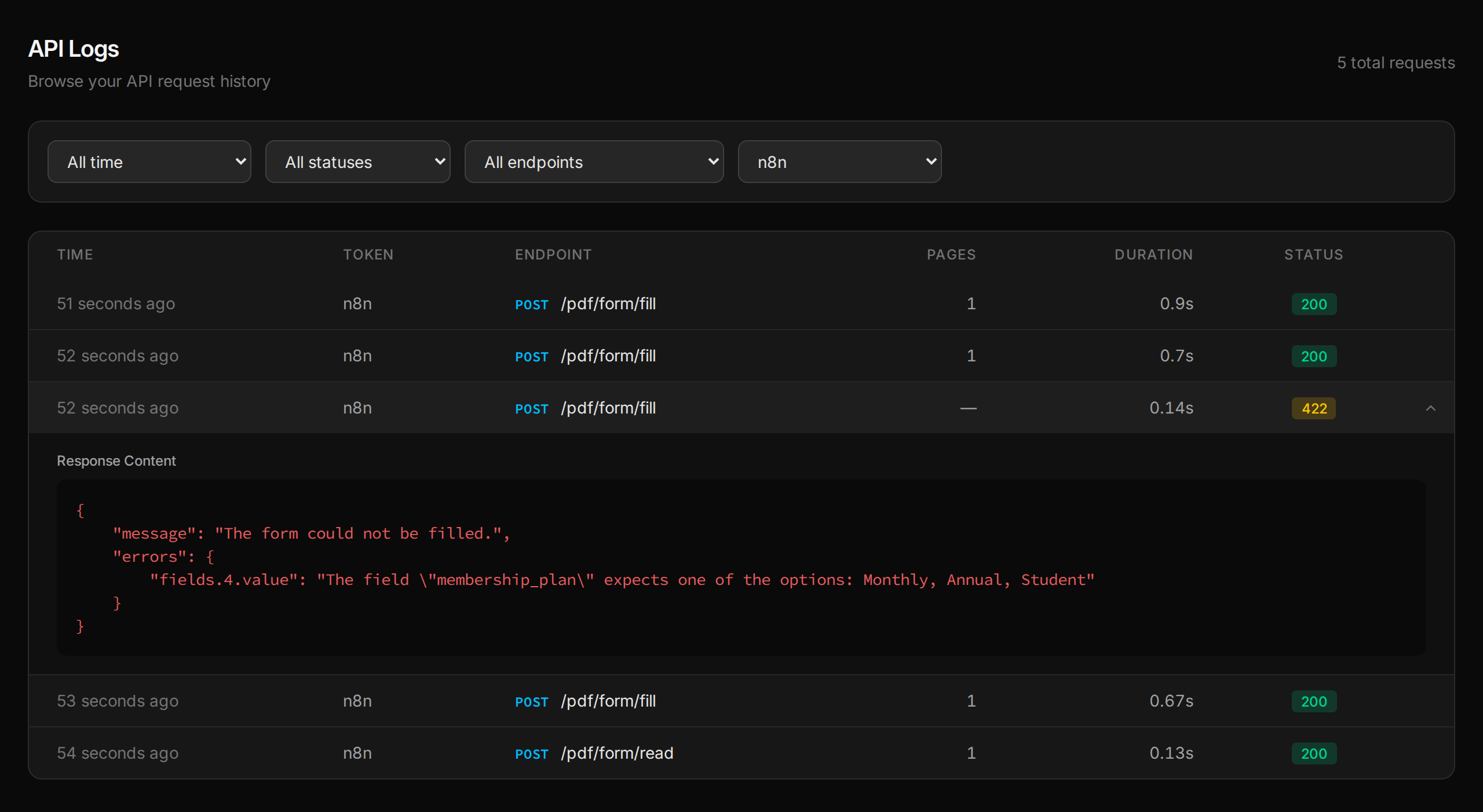
Here Hannah Cho's row said “student”. Fix the cell, and the next run fills her agreement. A field name that doesn't exist on the form is reported the same way.
Where to go from here
Prefilled forms out — and the filled ones coming back can be read just as easily.
Related tutorials
Fill Out Any PDF Form by Asking Claude
Chat assistants can tell you what goes into a PDF form, but they can't write it in. Connect Claude to Apdf over MCP and it sees the form as numbered boxes, matches your plain-language details to the right fields and dropdown options, and hands back the filled PDF — flattened if you want it locked.
Get PDF Form Field Names and Values in Python
Python form libraries hand you raw PDF objects to decode. Send the form URL to the Apdf API instead and get every field as JSON — name, value in a Python-friendly shape, options, required flag and the question printed next to it — then turn a folder of filled rental applications into a CSV that flags missing answers.
Convert PowerPoint to PDF in Node.js — Without Office on Your Server
Most pptx-to-pdf packages on npm need an office suite installed first. Convert decks with the Apdf API and Node's built-in fetch instead — a reusable helper, and an Express route that serves every sales deck as a cached PDF.
Your code made the PDF.
Then it went dark.
Opened, read, signed or ignored — you never see any of it. Send the PDFs you generate as personal links, and every open, page read, comment and signature comes back to your software as a webhook. Need it signed? Same link. Same account, same API key, one more call.
API · Webhook · MCP