
How to Collect Feedback on a PDF (Without the Email Chain)
You send a draft to three reviewers. What comes back: one reply-all thread with “see my comments in red”, one scanned printout with handwriting, and one “looks good” that turns into six change requests after the deadline. Merging it all into one actionable list is an afternoon of copy-paste archaeology.
In this tutorial you'll run the review round differently: reviewers mark up the PDF itself, right in the browser — and every highlight and comment comes back to you as structured, attributed data you can act on.
Put the draft behind reviewer links
Upload the PDF as a tracked document, then mint one link per reviewer. Each link carries the reviewer's identity, so every piece of feedback arrives already attributed — no “who wrote this?” round afterwards.
curl -X POST https://apdf.io/api/docs \
  -H "Authorization: Bearer YOUR_API_TOKEN" \
  -H "Accept: application/json" \
  -d file="https://your-server.com/homepage-redesign-proposal.pdf" \
  -d name="Homepage Redesign Proposal"

curl -X POST https://apdf.io/api/docs/f0235-80be1-dca39/links \
  -H "Authorization: Bearer YOUR_API_TOKEN" \
  -H "Accept: application/json" \
  -d name="Priya Shah" \
  -d email="priya@northwind.example"
{
"data": {
"token": "e9RUyunb",
"name": "Priya Shah",
"email": "priya@northwind.example",
"url": "https://docs.apdf.io/studio/f0235-80be1-dca39?v=e9RUyunb",
"is_active": true,
"last_viewed_at": null,
"created_at": "2026-07-22T10:18:24.000000Z"
}
}
Repeat for each reviewer and send everyone their own url.
Both steps also work in the dashboard if you prefer clicking over curl.
Let reviewers mark up the PDF in the browser
Your reviewers open their link and read the document in the hosted viewer — on any device, with nothing to install and no account to create. To give feedback, they select the passage and mark it up: highlight, underline, strikethrough, squiggly or a free-hand drawing — each optionally carrying a comment.
That's the whole reviewer experience. The feedback stays pinned to the exact words it's about — no more “the paragraph about pricing, somewhere on page 3”.
Watch the feedback land — as data
Every annotation shows up in your dashboard, grouped by page, with the marked passage and the comment side by side. Open your document under Documents and switch to the Annotations tab:
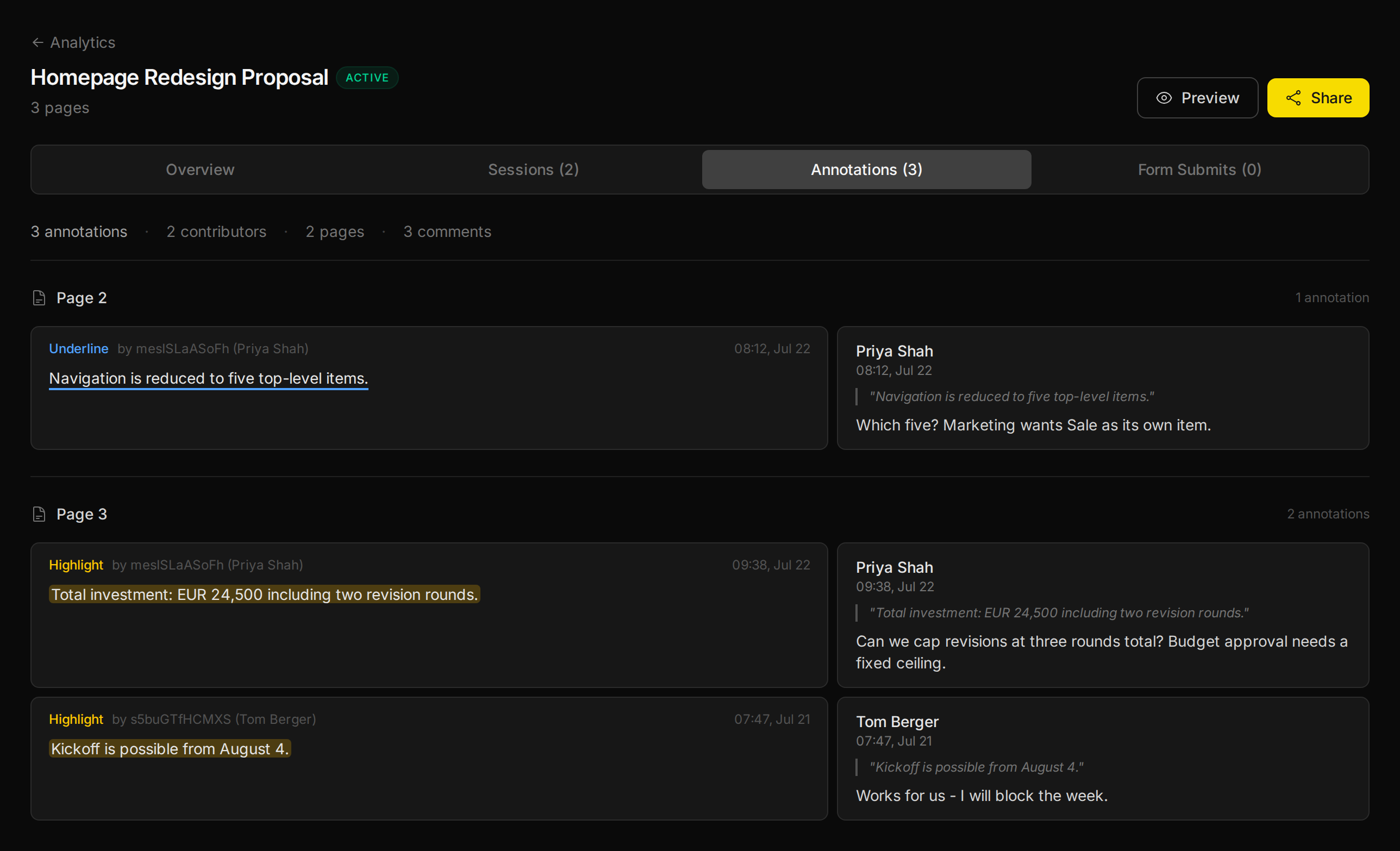
And because feedback here is data, not pixels, the same list is one API call away:
curl https://apdf.io/api/docs/f0235-80be1-dca39/annotations \
  -H "Authorization: Bearer YOUR_API_TOKEN" \
  -H "Accept: application/json"
{
"data": [
{
"annotation_id": "a-4f0c0029",
"page": 2,
"type": "underline",
"creator_id": "mesISLaASoFh",
"recipient": {
"name": "Priya Shah",
"email": "priya@northwind.example"
},
"annotated_text": "Navigation is reduced to five top-level items.",
"comment_author": "Priya Shah",
"comment_text": "Which five? Marketing wants Sale as its own item.",
"created_at": "2026-07-22T08:12:10.000000Z"
},
{
"annotation_id": "a-b60e8842",
"page": 3,
"type": "highlight",
"creator_id": "mesISLaASoFh",
"recipient": {
"name": "Priya Shah",
"email": "priya@northwind.example"
},
"annotated_text": "Total investment: EUR 24,500 including two revision rounds.",
"comment_author": "Priya Shah",
"comment_text": "Can we cap revisions at three rounds total? Budget approval needs a fixed ceiling.",
"created_at": "2026-07-22T09:38:10.000000Z"
},
{
"annotation_id": "a-77c1d3af",
"page": 3,
"type": "highlight",
"creator_id": "s5buGTfHCMXS",
"recipient": {
"name": "Tom Berger",
"email": "tom@northwind.example"
},
"annotated_text": "Kickoff is possible from August 4.",
"comment_author": "Tom Berger",
"comment_text": "Works for us - I will block the week.",
"created_at": "2026-07-21T07:47:10.000000Z"
}
]
}Get pinged the moment feedback arrives
Instead of re-checking the dashboard, let the feedback come to you. A when→then automation POSTs every new annotation to your endpoint as it's created:
- Go to Automations in the dashboard and click New Automation.
- Under “When this happens…” pick Annotation Created as the trigger.
- Under “Then do this…” paste your Webhook URL and save.
Each annotation now arrives at your endpoint with the reviewer, the marked passage and the comment — ready to become a Slack ping or a ticket:
{
    "automation": {
        "id": "df743-62cc4-2640c",
        "name": "New feedback on the proposal"
    },
    "document": {
        "doc_id": "f0235-80be1-dca39",
        "name": "Homepage Redesign Proposal",
        "viewer_url": "https://docs.apdf.io/studio/f0235-80be1-dca39",
        "file_pages": 3
    },
    "trigger": {
        "matched_event": "annotation:create",
        "conditions_evaluated": false
    },
    "event": {
        "session_id": "5xbDANCDZi9HwWcd",
        "viewer_id": "s5buGTfHCMXS",
        "recipient": {
            "name": "Tom Berger",
            "email": "tom@northwind.example"
        },
        "data": {
            "page": 3,
            "type": "highlight",
            "comment_text": "Works for us - I will block the week.",
            "comment_author": "Tom Berger",
            "annotated_text": "Kickoff is possible from August 4."
        }
    },
    "session": {
        "total_duration_ms": 41800,
        "pages_viewed": 3,
        "completion_rate": 100
    },
    "timestamp": "2026-07-21T07:47:10+00:00"
}Compile the round into a digest with Ruby
When the review round closes, one small script turns all the feedback into a digest — grouped by reviewer, ordered by page. Plain Ruby, no gems:
require "net/http"
require "json"

API_TOKEN = ENV.fetch("APDF_API_TOKEN")
DOC_ID = ENV.fetch("DOC_ID")
BASE_URL = ENV.fetch("APDF_BASE_URL", "https://apdf.io")

uri = URI("#{BASE_URL}/api/docs/#{DOC_ID}/annotations")
request = Net::HTTP::Get.new(uri)
request["Authorization"] = "Bearer #{API_TOKEN}"
request["Accept"] = "application/json"

response = Net::HTTP.start(uri.hostname, uri.port, use_ssl: uri.scheme == "https") do |http|
  http.request(request)
end
annotations = JSON.parse(response.body).fetch("data")

# Group the feedback by reviewer
by_reviewer = annotations.group_by { |a| a.dig("recipient", "name") || a["comment_author"] }

puts "Feedback digest — #{annotations.size} annotation(s) from #{by_reviewer.size} reviewer(s)"
puts "=" * 60

by_reviewer.each do |reviewer, notes|
  puts "\n#{reviewer} (#{notes.size}):"

  notes.sort_by { |a| a["page"] }.each do |a|
    puts "  p#{a['page']} · #{a['type']}"
    puts "    “#{a['annotated_text']}”"
    puts "    → #{a['comment_text']}" unless a["comment_text"].to_s.empty?
  end
end
APDF_API_TOKEN=your_token DOC_ID=f0235-80be1-dca39 ruby feedback_digest.rbFeedback digest — 3 annotation(s) from 2 reviewer(s)
============================================================
Priya Shah (2):
p2 · underline
“Navigation is reduced to five top-level items.”
→ Which five? Marketing wants Sale as its own item.
p3 · highlight
“Total investment: EUR 24,500 including two revision rounds.”
→ Can we cap revisions at three rounds total? Budget approval needs a fixed ceiling.
Tom Berger (1):
p3 · highlight
“Kickoff is possible from August 4.”
→ Works for us - I will block the week.Every remark, attributed and anchored to the exact passage — the copy-paste archaeology is gone.
Where to go from here
Annotations are the loudest reader signal — and only one of several this document now streams.
Related tutorials
Handle Document Webhooks Reliably
Webhook demos end at 200 OK; production starts there. One plain-JDK Java file covers the three duties the delivery contract implies — ack fast (10s timeout, no retries), dedupe durably (state that survives restarts), and reconcile against the execution log, which carries every failed delivery's full payload for safe replay.
Stream PDF Reader Events into Your Own Database
Your warehouse answers questions no analytics UI anticipates. One automation fires on every engagement moment; a small Go receiver lands each webhook in Postgres — attributed, session-enriched, and idempotent under redelivery — so reading behavior becomes a column you can join against your CRM.
Get Notified Only for PDF Engagement That Matters
The ping-on-every-open automation gets muted within a week. The Only-if box fixes it: stack conditions like total reading time and completion rate, and a 15-second skim stays silent while the cover-to-cover read sends exactly one notification — proven live with two readers.