
How to See Who Viewed Your PDF — and What They Actually Read
You sent the proposal to three people. One of them says “looks great”, one says nothing, one asks for “a bit more time.” Who actually read it? Who got to the pricing? Who never even opened it? An email attachment will never tell you — it can't.
In this tutorial you'll share one PDF through a personal tracking link per recipient and answer those questions with data: who opened it, how long they read each page, where they stopped — first in the dashboard, then as a report your own code can pull.
🔥 Priya Shah 1 session(s) · 0m 50s read · 67% completed
💤 Sam Chen never opened — resend or follow up
Turn your PDF into a tracked document
Upload your PDF in the Apdf dashboard or create it via the API. Instead of a file that disappears into inboxes, you get a document: hosted in a viewer that records every reader session.
curl -X POST https://apdf.io/api/docs \
  -H "Authorization: Bearer YOUR_API_TOKEN" \
  -H "Accept: application/json" \
  -d file="https://your-server.com/proposal.pdf" \
  -d name="Proposal Acme Redesign"
{
"data": {
"doc_id": "7161c-b9c9b-4ae76",
"viewer_url": "https://docs.apdf.io/studio/7161c-b9c9b-4ae76",
"file_url": "https://apdf-files.s3.eu-central-1.amazonaws.com/docs/202607/3c2aa1476a5fabfc6d893.pdf",
"name": "Proposal Acme Redesign",
"file_size": 223950,
"file_pages": 3,
"is_public": false,
"created_at": "2026-07-21T17:27:24.000000Z",
"archived_at": null
}
}Mint a personal link for each recipient
Here's the move that makes per-recipient analytics possible: every person gets their own tokenized URL. When Alex opens Alex's link, the session is attributed to Alex — no reader logins, no “anonymous visitor #4”.
curl -X POST https://apdf.io/api/docs/7161c-b9c9b-4ae76/links \
  -H "Authorization: Bearer YOUR_API_TOKEN" \
  -H "Accept: application/json" \
  -d name="Alex Rivera" \
  -d email="alex@acme.example"
{
"data": {
"token": "qIlwuIww",
"name": "Alex Rivera",
"email": "alex@acme.example",
"url": "https://docs.apdf.io/studio/7161c-b9c9b-4ae76?v=qIlwuIww",
"is_active": true,
"last_viewed_at": null,
"created_at": "2026-07-21T17:27:37.000000Z"
}
}
Repeat for Priya and Sam (or create the links in the dashboard with two clicks each).
Each response contains the url you send to that one
person — by email, chat, wherever.
recipient: null in everything that follows.
Watch the sessions come in — with names attached
From the moment the links go out, every open shows up in the dashboard: go to Documents → Analytics, open your document and switch to the Sessions tab. Every session is listed with the recipient behind it — here's ours after Alex and Priya clicked their links:
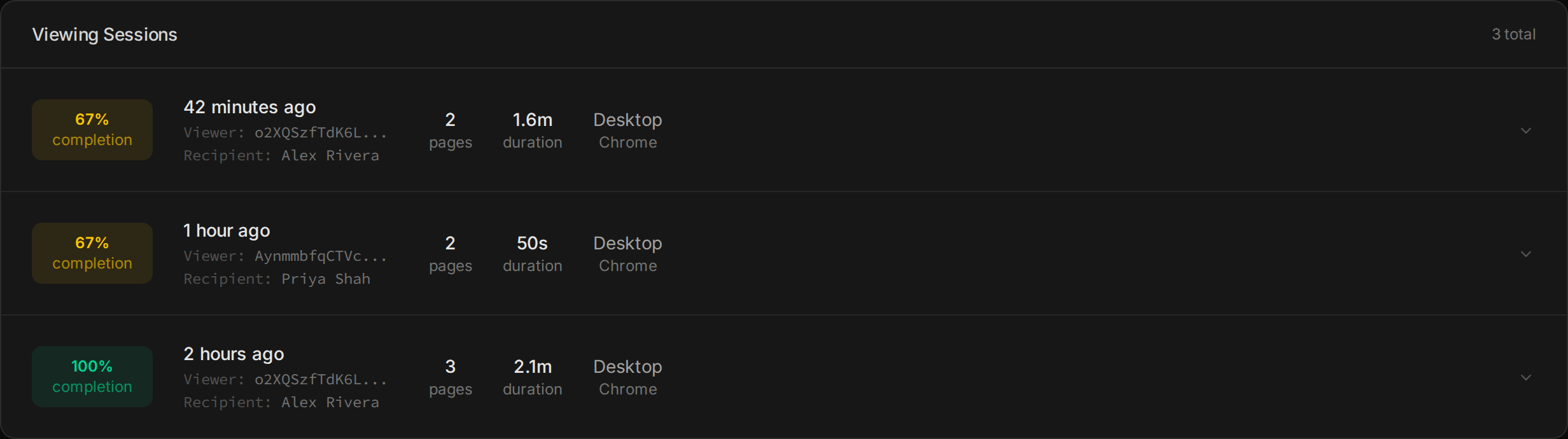
Alex read everything two hours ago and came back for a second look; Priya stopped at 67%. The same list is one GET away:
curl https://apdf.io/api/docs/7161c-b9c9b-4ae76/analytics/sessions \
  -H "Authorization: Bearer YOUR_API_TOKEN" \
  -H "Accept: application/json"
{
"data": [
{
"session_id": "vo8hqJuHMi0Jk6SQ",
"viewer_id": "V1WlJzltK4p4hebF",
"recipient": {
"name": "Alex Rivera",
"email": "alex@acme.example"
},
"device_type": "desktop",
"browser": "Chrome",
"os": "OS X",
"referer": null,
"utm_source": null,
"created_at": "2026-07-21 18:19:06.992",
"pages_viewed": 2,
"total_duration_ms": 93000,
"completion_pct": 67,
"prints": 0,
"downloads": 0
},
{
"session_id": "W2IW64OpcaILHZl3",
"viewer_id": "EMSA9wDPiekiSgZ1",
"recipient": {
"name": "Priya Shah",
"email": "priya@acme.example"
},
"device_type": "desktop",
"browser": "Chrome",
"os": "OS X",
"referer": null,
"utm_source": null,
"created_at": "2026-07-21 17:52:07.042",
"pages_viewed": 2,
"total_duration_ms": 50000,
"completion_pct": 67,
"prints": 0,
"downloads": 0
},
{
"session_id": "qpafBGeEledMhLRZ",
"viewer_id": "V1WlJzltK4p4hebF",
"recipient": {
"name": "Alex Rivera",
"email": "alex@acme.example"
},
"device_type": "desktop",
"browser": "Chrome",
"os": "OS X",
"referer": null,
"utm_source": null,
"created_at": "2026-07-21 17:41:06.814",
"pages_viewed": 3,
"total_duration_ms": 126000,
"completion_pct": 100,
"prints": 0,
"downloads": 0
}
]
}
Three sessions, and the story is already readable: Alex read the whole thing at 17:41
(completion_pct: 100) and came back at 18:19
— same viewer_id, new session. Priya opened once
and stopped at 67%. And Sam? No session at all — which is exactly why the next
step joins this list against your recipient links.
Zoom into one session — page by page
A session row tells you how much; the session detail tells you what.
Pull Alex's return visit by its session_id:
curl https://apdf.io/api/docs/7161c-b9c9b-4ae76/analytics/sessions/vo8hqJuHMi0Jk6SQ \
  -H "Authorization: Bearer YOUR_API_TOKEN" \
  -H "Accept: application/json"
{
"data": {
"session": {
"session_id": "vo8hqJuHMi0Jk6SQ",
"viewer_id": "V1WlJzltK4p4hebF",
"recipient": {
"name": "Alex Rivera",
"email": "alex@acme.example"
},
"device_type": "desktop",
"browser": "Chrome",
"os": "OS X",
"referer": null,
"utm_source": null,
"utm_medium": null,
"utm_campaign": null,
"created_at": "2026-07-21 18:19:06.992"
},
"metrics": {
"total_duration_ms": 93000,
"pages_viewed": 2,
"total_pages": 3,
"completion_pct": 67,
"downloads": 0,
"prints": 0
},
"pages": [
{
"page": 1,
"views": 1,
"duration_ms": 6000,
"viewed": true
},
{
"page": 2,
"views": 0,
"duration_ms": 0,
"viewed": false
},
{
"page": 3,
"views": 1,
"duration_ms": 87000,
"viewed": true
}
],
"events": [
{
"event": "document:loaded",
"page": null,
"duration_ms": null,
"total_pages": 3,
"payload": null,
"created_at": "2026-07-21 18:19:06.745"
},
{
"event": "page:enter",
"page": 3,
"duration_ms": null,
"total_pages": 3,
"payload": null,
"created_at": "2026-07-21 18:19:07.745"
},
{
"event": "page:read",
"page": 3,
"duration_ms": null,
"total_pages": 3,
"payload": null,
"created_at": "2026-07-21 18:19:14.745"
},
{
"event": "page:leave",
"page": 3,
"duration_ms": 87000,
"total_pages": 3,
"payload": null,
"created_at": "2026-07-21 18:20:34.745"
},
{
"event": "page:enter",
"page": 1,
"duration_ms": null,
"total_pages": 3,
"payload": null,
"created_at": "2026-07-21 18:20:35.245"
},
{
"event": "page:leave",
"page": 1,
"duration_ms": 6000,
"total_pages": 3,
"payload": null,
"created_at": "2026-07-21 18:20:41.245"
}
]
}
}
Look at the pages block: Alex came back, went
straight to page 3 — the pricing — and spent 87 seconds there,
skipping page 2 entirely. That's not “a view.” That's a buying signal with
a page number on it.
Build the per-recipient report in Python
Now fold it into the report from the top of this page: one line per recipient, ranked by reading time, with the people who never opened flagged at the bottom. Standard library only — no packages to install.
import json
import os
import urllib.request

API = "https://apdf.io/api"
TOKEN = os.environ["APDF_API_TOKEN"]
DOC_ID = os.environ["APDF_DOC_ID"]


def get(path):
    req = urllib.request.Request(f"{API}{path}", headers={
        "Authorization": f"Bearer {TOKEN}",
        "Accept": "application/json",
    })
    with urllib.request.urlopen(req) as response:
        return json.load(response)["data"]


links = get(f"/docs/{DOC_ID}/links")
sessions = get(f"/docs/{DOC_ID}/analytics/sessions")

# Group the sessions by recipient email
readers = {}
for session in sessions:
    recipient = session["recipient"]
    if not recipient:
        continue
    r = readers.setdefault(recipient["email"], {
        "name": recipient["name"], "sessions": 0, "duration_ms": 0, "completion": 0,
    })
    r["sessions"] += 1
    r["duration_ms"] += session["total_duration_ms"]
    r["completion"] = max(r["completion"], session["completion_pct"])

# Rank: most reading time first, never-opened last
for link in sorted(links, key=lambda l: -readers.get(l["email"], {}).get("duration_ms", 0)):
    reader = readers.get(link["email"])
    if reader:
        minutes, seconds = divmod(reader["duration_ms"] // 1000, 60)
        print(f"🔥 {reader['name']:<12} {reader['sessions']} session(s) · "
              f"{minutes}m {seconds:02d}s read · {reader['completion']}% completed")
    else:
        print(f"💤 {link['name']:<12} never opened — resend or follow up")
APDF_API_TOKEN="YOUR_API_TOKEN" APDF_DOC_ID="7161c-b9c9b-4ae76" python3 report.py
🔥 Alex Rivera 2 session(s) · 3m 39s read · 100% completed
🔥 Priya Shah 1 session(s) · 0m 50s read · 67% completed
💤 Sam Chen never opened — resend or follow upThat's the whole loop: three recipients, three completely different follow-ups — close Alex, nudge Priya past page 2, resend to Sam. And because it's an API, the same data can land in your CRM, your morning standup bot, or your own product instead of a terminal.
Where to go from here
You can now read the room. Next, make the room come to you.
Related tutorials
See If Clients Actually Read Your Monthly Reports
The report nobody reads is the retainer nobody renews. Tracked links per client sort the portfolio in one sweep — both Meridian stakeholders read cover to cover, Brightpath flicked for 15 seconds, Okafor never opened — and per-page data tells you whether your decision request was ever seen.
Track Who Reads Your Press Kit
Twenty pitches, twenty attached kits, and a silence that could mean anything. Per-journalist links end the blindness: the full read plus asset download says she's writing, the fact-sheet return visit says offer the interview now, and the never-opened rows say re-pitch — not follow up.
Freelancers: A Proposal Workflow Without Per-Seat Tools
Proposal software is priced for sales teams; freelancers just need the signal. A one-person workflow on the free plan: links per contact reveal the 12-minute open, the internal forward, and the 21:21 return visit that camped on the price page — plus the three-slot pipeline trick and honest edges.