
How to Watermark Draft PDFs via Claude Before Sharing
The draft that leaks is never the one you watermarked. Stamping happens right before sharing — the moment you're busiest — and the desktop-tool ritual (open, position, transparency, export, repeat per reviewer) is exactly long enough to skip “just this once.”
Conversationally, it's one message. And because the Apdf MCP toolbelt includes PDF generation, the agent doesn't need a pre-made stamp file — it designs the watermark itself, then overlays it.
Connect the agent to Apdf
claude mcp add --transport http apdf https://apdf.io/mcp/mainAsk for the stamp — the agent designs it
https://files.northlight.example/drafts/benchmark-report.pdf
Two tools did the work: create-pdf-file turned the
agent's HTML into a one-page stamp PDF, and
overlay-pdf-pages laid it over the document —
repeat: "1" maps the single stamp page onto
every page of the base file:
{
    "file": "https://apdf-files.s3.eu-central-1.amazonaws.com/dd9aba7c6a61e518d9351.pdf",
    "expiration": "2026-07-23T10:55:37.376183Z"
}Let the agent show its work
Trust, but render: the agent can convert a stamped page to an image so you see the result without downloading anything — this is page 1 of the actual output:
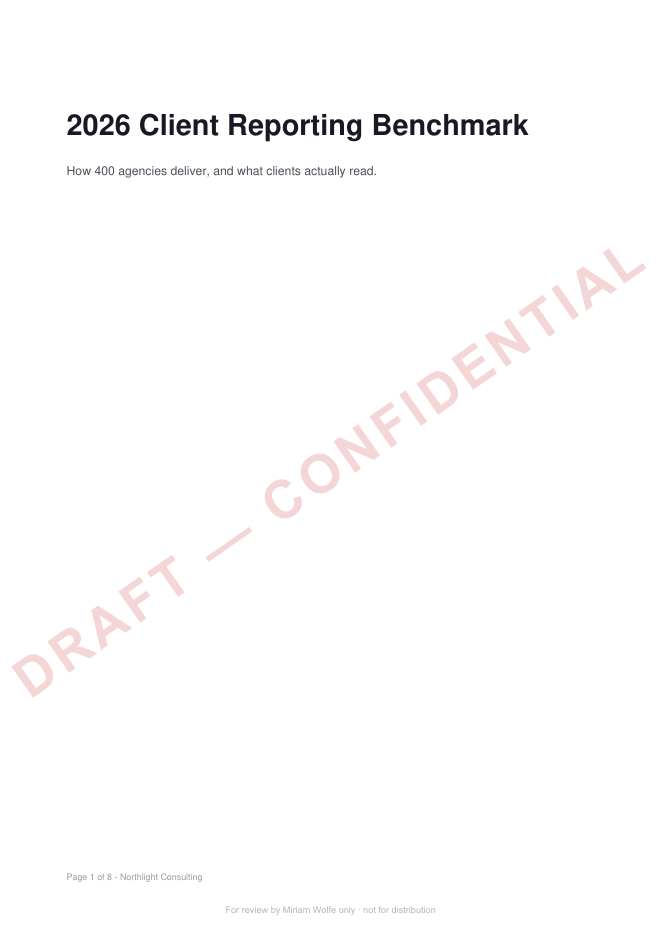
Content readable, stamp unmistakable, reviewer named. That render came from
convert-pdf-to-image in the same conversation.
One copy per reviewer
That's the deterrence play: personalized stamps make forwarding traceable. Pair it with revocable tracking links instead of email attachments and you keep the other half of the control too — who can still open it, and who actually read it.
Where to go from here
The same connection carries every PDF operation — and the engagement layer behind them.
Related tutorials
Automate PDF Watermarking: Add Logos to Documents in Bulk
This tutorial explains how to automate PDF watermarking using Ruby and the Apdf Overlay API. By layering a transparent PDF onto original documents, developers can bulk-process files and use parameters to target specific page ranges (e.g., skipping cover pages).
Turn Scanned Invoices into Structured Data with an Agent
OCR reads tabular scans in scrambled order — the wall every regex parser dies against, and exactly where the agent shines: it reassembles vendor, number, date and line items from the mess, cross-checks the sums against each stated total, and flags mismatches for human eyes instead of your books.
Search a PDF From Your Editor
The integration spec is a PDF and your questions arrive mid-function. With the editor connected over MCP, 'what's the retry policy?' comes back with the exact line and page — and a regex search turns 'list every error code' into one call with three cited matches.
Your code made the PDF.
Then it went dark.
Opened, read, re-read, dropped on page 4 — you never see any of it. Share the PDFs you generate through Apdf recipient links, and every signal becomes something you can act on: ping Slack, update the CRM, let an agent follow up. Same account, same API token, one more call.
API · Webhook · MCP