
How to Create HubSpot Tasks from PDF Engagement
The quote goes out, the prospect reads it — and HubSpot knows nothing. Whoever works the deal next sees a contact record frozen at “quote sent”, while the actual buying signal happened yesterday in a PDF viewer.
In this tutorial you'll close that gap without code: when a prospect really reads your quote — not a two-second bounce — a follow-up task appears in HubSpot, on the right contact, by itself.
Send the quote through recipient links
Upload the quote and mint one link per prospect — the recipient's email in the payload is what will match the HubSpot contact later:
curl -X POST https://apdf.io/api/docs/4352c-99928-25aa1/links \
  -H "Authorization: Bearer YOUR_API_TOKEN" \
  -H "Accept: application/json" \
  -d name="Alex Moreau" \
-d email="alex@clientco.example"Fire only on real reads — with a condition
A task for every two-second bounce would train your team to ignore the tasks. Conditions fix that: trigger on reading activity, but only when the session has covered most of the document.
- Go to Automations → New Automation and pick Page Read under “When this happens…”.
- Under “Only if…” add the condition “Completion rate at least” and set it to 80%.
- Under “Then do this…” paste your Zapier catch-hook URL (next step) and save.
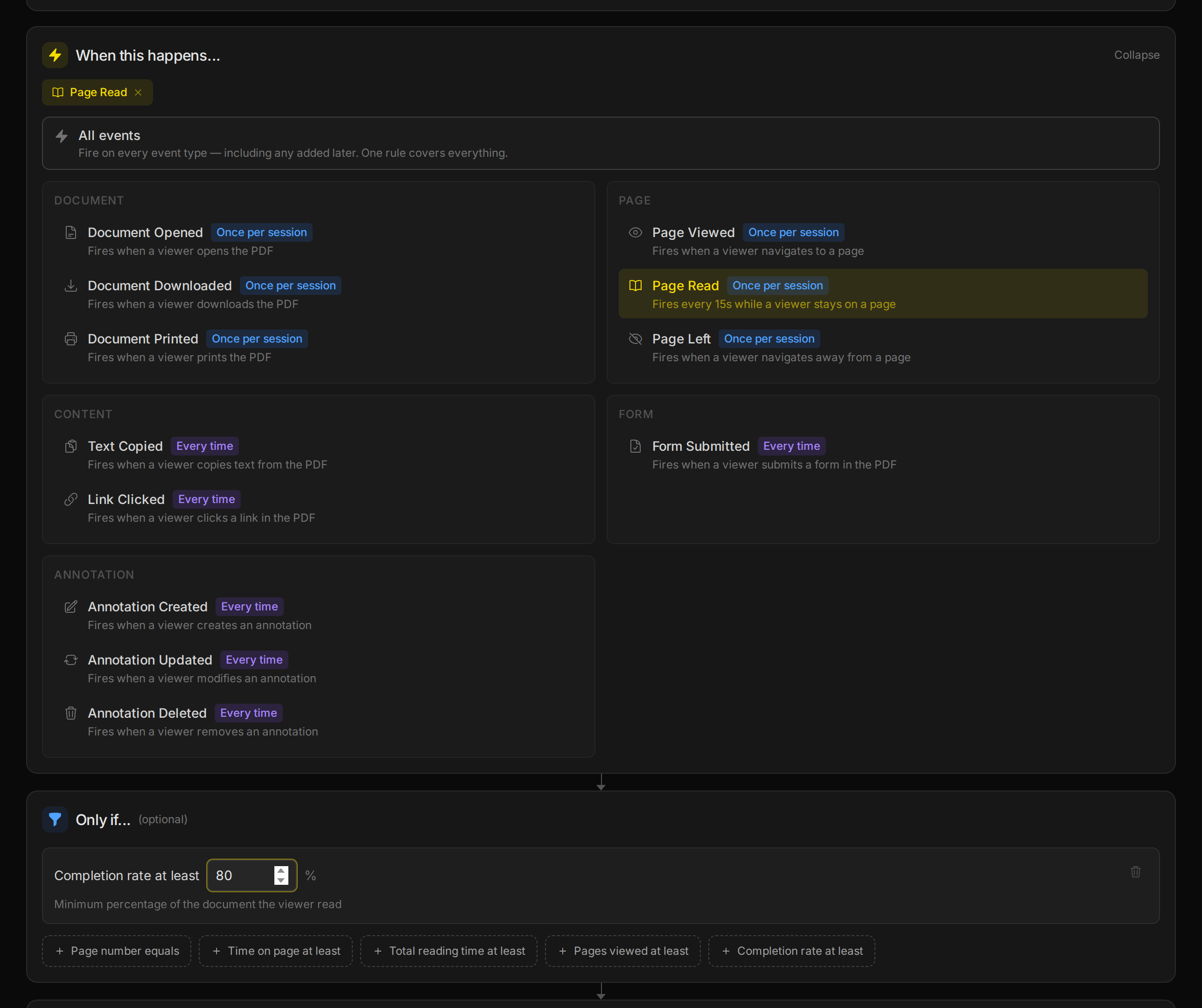
The trigger fires at most once per reading session, and only when the condition holds — here's the real payload for a full read:
{
    "automation": {
        "id": "ac732-a57e5-671d7",
        "name": "Create CRM task on a real read"
    },
    "document": {
        "doc_id": "4352c-99928-25aa1",
        "name": "Q3 Services Proposal",
        "viewer_url": "https://docs.apdf.io/studio/4352c-99928-25aa1",
        "file_pages": 3
    },
    "trigger": {
        "matched_event": "page:read",
        "conditions_evaluated": true
    },
    "event": {
        "session_id": "sHubTask0RealRd1",
        "viewer_id": "aMxV3nKj9qLp2wSe",
        "recipient": {
            "name": "Alex Moreau",
            "email": "alex@clientco.example"
        },
        "data": {
            "page": 1,
            "duration_ms": 21000
        }
    },
    "session": {
        "total_duration_ms": 82000,
        "pages_viewed": 3,
        "completion_rate": 100
    },
    "timestamp": "2026-07-23T07:17:09+00:00"
}Turn the payload into a HubSpot task
- In Zapier, create a Zap with the trigger Webhooks by Zapier → Catch Hook; its URL is what you pasted in step 2. Open your link once so Zapier learns the payload shape.
- Add HubSpot → Find Contact and search by Event Recipient Email — that binds the read to the right person.
- Add HubSpot → Create Engagement (type: Task), associate it with the found contact, and compose the title from the payload: Follow up — Event Recipient Name read Document Name.
- Turn the Zap on. Real reads now file their own follow-ups.
Where to go from here
One signal, one task — the same pipeline covers every play your CRM should know about.
Related tutorials
Get Notified Only for PDF Engagement That Matters
The ping-on-every-open automation gets muted within a week. The Only-if box fixes it: stack conditions like total reading time and completion rate, and a 15-second skim stays silent while the cover-to-cover read sends exactly one notification — proven live with two readers.
How to Log Every PDF View in a Google Sheet
Build a living view log without writing code: a Document Opened automation posts every view to a Zapier catch hook, and each open becomes a spreadsheet row with timestamp, document and reader. Filters, pivots and a COUNTIF later, your sheet is a mini engagement dashboard.
How to Get Notified When Someone Opens Your PDF
Share your PDF through a per-recipient tracking link and get a webhook the moment it's opened — with the reader's name attached. Then turn the event into a Slack message with Zapier or a 20-line Node.js forwarder. The full notification pipeline in about 10 minutes.