
Turn a Word Proposal into a Tracked Link by Asking Claude
A proposal sent as a .docx attachment leaves your hands for good.
It opens with different fonts on every machine, anyone can change your prices in it, and you never
learn whether the CFO got past the cover page. Then comes the awkward “just checking you
received it” email.
Share it as a link instead — one per person, so every view has a name on it. With Claude connected to Apdf over MCP, that's a single request: the agent converts the Word file to PDF, stores it as a tracked document and mints the links. Later, the same chat answers the question that matters: did they read it?
“Did they read it?” → Daniel read every page and came back for the pricing; Sofia went straight to it on her phone
Connect Claude to Apdf
Add the MCP server once — it's a single OAuth-signed endpoint:
claude mcp add --transport http apdf https://apdf.io/mcp/mainThat's the Claude Code command; in Claude Desktop the same URL goes in as a custom connector. The connection tutorial walks through both.
Ask Claude to send the proposal
Give Claude a link to the Word file and say who it's for. The tools take a URL that the server can download, so paste a direct file link — from your file storage, an intranet or a presigned bucket URL — rather than dragging the file into the chat. A share link that opens a preview page instead of the file itself is turned away as “not a valid Office document”.
https://files.haldenstudio.example/proposals/halden-proposal-acme-freight.docx
Daniel Okoro: https://docs.apdf.io/office-studio-c/07610-6c714-12e57?v=r368iNqA
Sofia Marchetti: https://docs.apdf.io/office-studio-c/07610-6c714-12e57?v=PDmynJci
Four tools, chained by the agent. Tracked documents are always PDFs —
create-document takes a PDF URL and nothing else — so the
Word file goes through convert-office-to-pdf first. That
conversion always runs in the background: the tool returns a job id, and Claude polls
check-job-status until the PDF is ready. Its first look caught
the job mid-flight:
{
    "id": "01M56ZQHKDEYSWR8HCQ1S02MM3",
    "created": "2026-10-18T07:48:28.000000Z",
    "status": "running",
    "result": null
}
A few seconds later, the finished job:
{
    "id": "01M56ZQHKDEYSWR8HCQ1S02MM3",
    "created": "2026-10-18T07:48:28.000000Z",
    "status": "successful",
    "result": {
        "file": "https://apdf-files.s3.eu-central-1.amazonaws.com/f23189986ad479cd95e23.pdf",
        "size": 117364,
        "pages": 4,
        "expiration": "2026-10-18T08:48:32.082913Z"
    }
}expiration). That's no problem
here: create-document copies the PDF into your workspace right away, and the
tracked document stays until you delete it.
Check what your readers will see
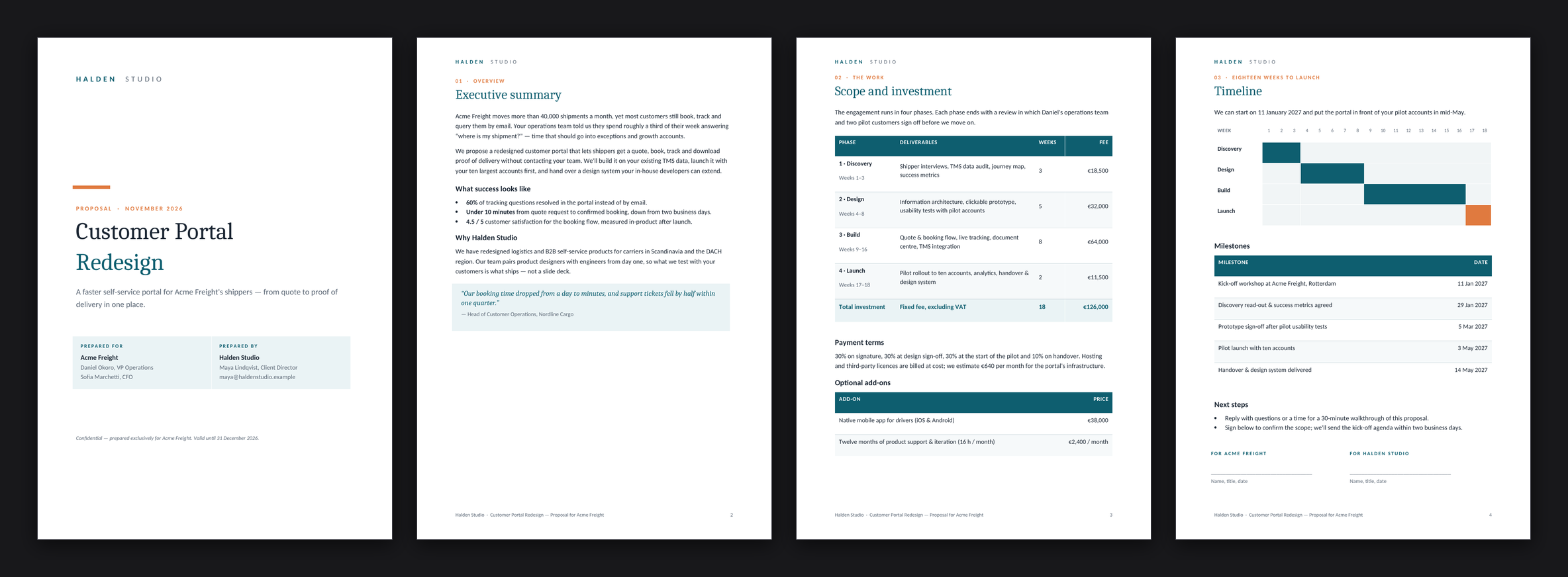
The PDF is the version every recipient sees — same fonts, same page breaks, on a laptop or a phone, and no editable prices. Here's our proposal after the conversion, without Microsoft Office involved:
And the tracked document Claude created from it:
{
    "data": {
        "doc_id": "07610-6c714-12e57",
        "viewer_url": "https://docs.apdf.io/office-studio-c/07610-6c714-12e57",
        "file_url": "https://apdf-files.s3.eu-central-1.amazonaws.com/docs/202610/7bcdbc9f6ad479e376ddf.pdf",
        "name": "Customer Portal Redesign – Proposal for Acme Freight",
        "file_size": 118531,
        "file_pages": 4,
        "is_public": false,
        "created_at": "2026-10-18T07:48:51.000000Z",
        "archived_at": null
    }
}Send each person their own link
create-document-link ran once per decision maker. Each link carries
a token (?v=…) that ties every session opened with it to that
person — no logins for your readers. Daniel's link:
{
    "data": {
        "token": "r368iNqA",
        "name": "Daniel Okoro",
        "email": "daniel.okoro@acmefreight.example",
        "url": "https://docs.apdf.io/office-studio-c/07610-6c714-12e57?v=r368iNqA",
        "is_active": true,
        "last_viewed_at": null,
        "created_at": "2026-10-18T07:48:56.000000Z"
    }
}
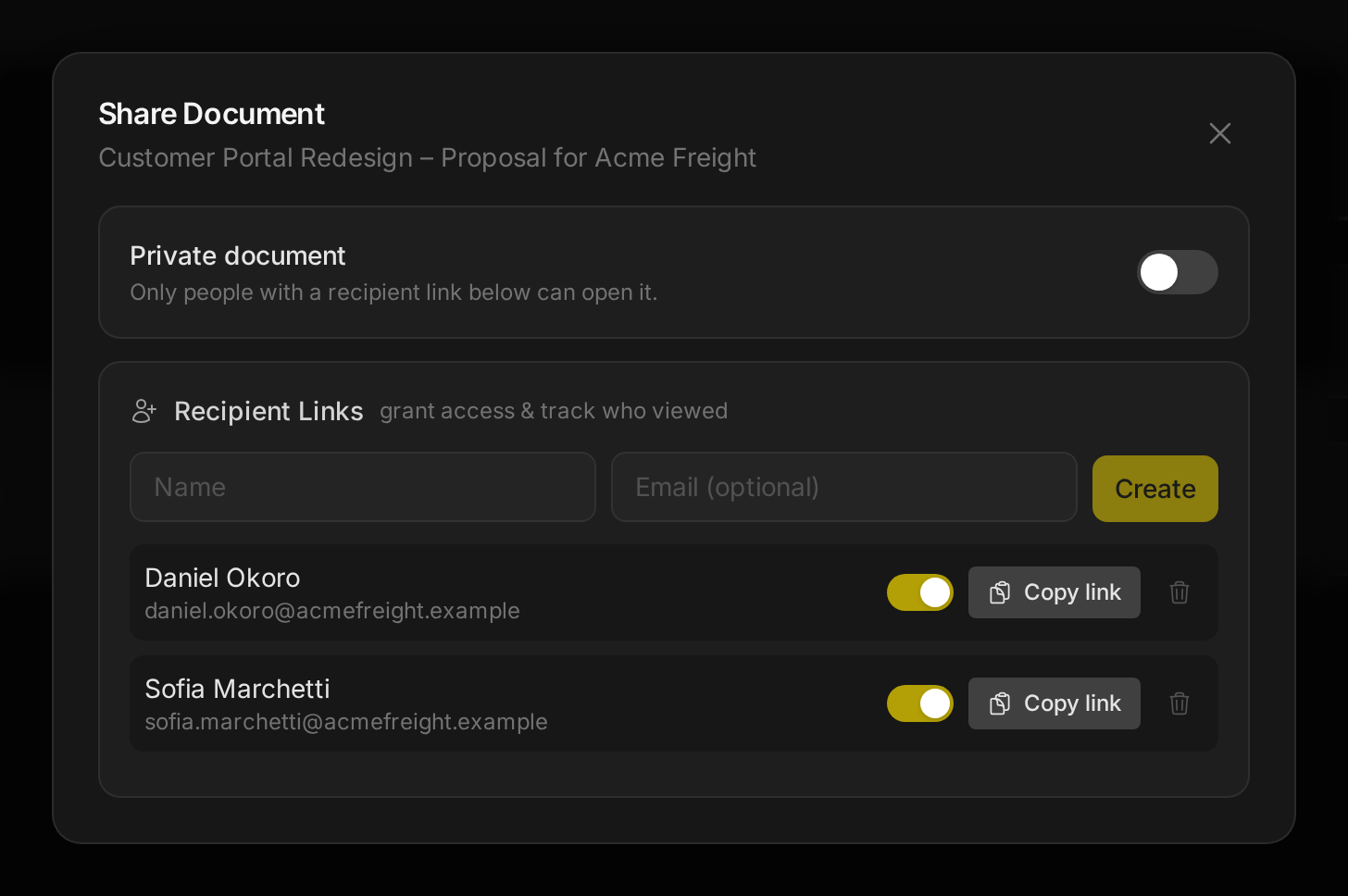
Paste each URL into your email to that person. Both links also show up in the dashboard: under Documents → Manage, the document's Share button lists them as Recipient Links, each with a switch to turn it off:
Ask Claude: did they read it?
The links went out by email. Back in the same chat — no dashboard needed — ask the question you'd otherwise answer with a nervous follow-up:
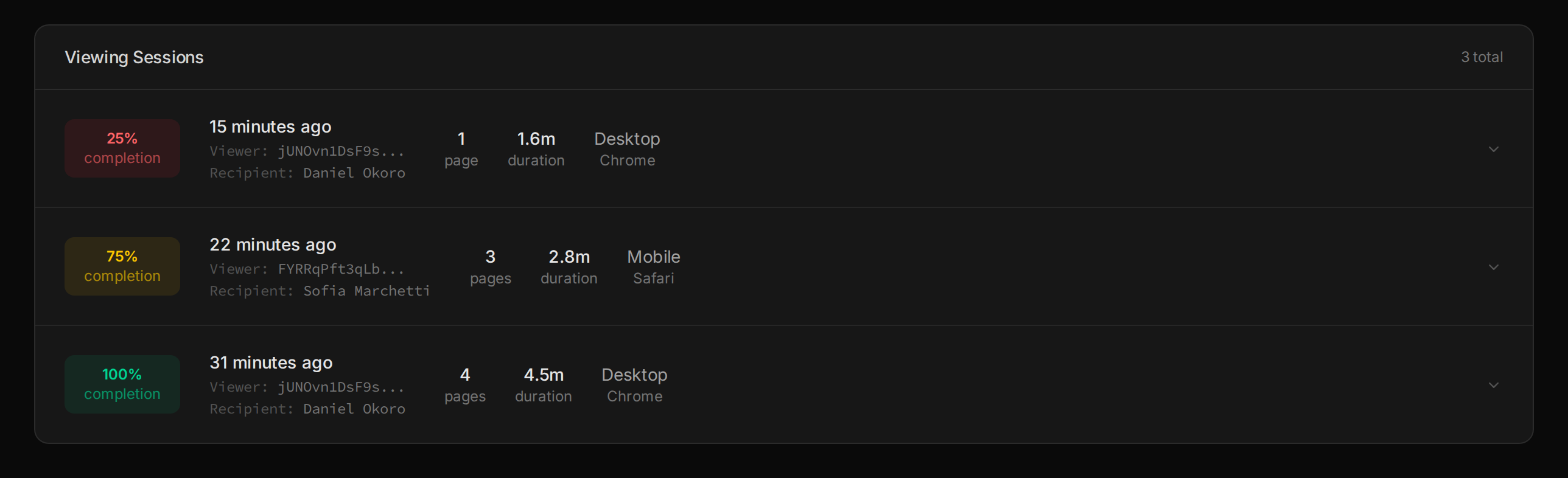
Daniel Okoro read all four pages on his desktop (4m 30s), longest on Scope and investment (2m 06s). Later he came back for another 1m 37s on that page alone.
Sofia Marchetti read on her phone: six seconds on the cover, then straight to Scope and investment for 2m 28s and a quick look at the timeline. She never opened the executive summary.
Pricing is the open question for both of them. Rather than resending the proposal, I'd offer Sofia a short call on the payment terms.
The answer is built from the real sessions, each one already attributed to a recipient. This is
what list-document-sessions returned:
{
    "data": [
        {
            "session_id": "hH1TGyDPLwkNuMEq",
            "viewer_id": "jUNOvn1DsF9sz0o3",
            "recipient": {
                "name": "Daniel Okoro",
                "email": "daniel.okoro@acmefreight.example"
            },
            "device_type": "desktop",
            "browser": "Chrome",
            "os": "OS X",
            "referer": null,
            "utm_source": null,
            "created_at": "2026-10-18 08:14:20.731",
            "pages_viewed": 1,
            "total_duration_ms": 97000,
            "completion_pct": 25,
            "prints": 0,
            "downloads": 0
        },
        {
            "session_id": "uP3sugSNaijJPW9M",
            "viewer_id": "FYRRqPft3qLbfI77",
            "recipient": {
                "name": "Sofia Marchetti",
                "email": "sofia.marchetti@acmefreight.example"
            },
            "device_type": "mobile",
            "browser": "Safari",
            "os": "iOS",
            "referer": null,
            "utm_source": null,
            "created_at": "2026-10-18 08:06:42.086",
            "pages_viewed": 3,
            "total_duration_ms": 165000,
            "completion_pct": 75,
            "prints": 0,
            "downloads": 0
        },
        {
            "session_id": "dNxImh0dTOgqaWJv",
            "viewer_id": "jUNOvn1DsF9sz0o3",
            "recipient": {
                "name": "Daniel Okoro",
                "email": "daniel.okoro@acmefreight.example"
            },
            "device_type": "desktop",
            "browser": "Chrome",
            "os": "OS X",
            "referer": null,
            "utm_source": null,
            "created_at": "2026-10-18 07:58:07.412",
            "pages_viewed": 4,
            "total_duration_ms": 270000,
            "completion_pct": 100,
            "prints": 0,
            "downloads": 0
        }
    ]
}
Two of the three sessions share a viewer_id: that's Daniel coming
back. The page-by-page view came from get-document-session
— for Sofia's session it reported page 3 at 148000 ms and page 2
as "viewed": false, which is how Claude knows she skipped the
summary. You can see the same sessions in the dashboard under Documents →
Analytics, on the document's Sessions tab:
Where to go from here
One proposal is a conversation; a pipeline of them is where the agent earns its keep.
Related tutorials
See If Clients Actually Read Your Monthly Reports
The report nobody reads is the retainer nobody renews. Tracked links per client sort the portfolio in one sweep — both Meridian stakeholders read cover to cover, Brightpath flicked for 15 seconds, Okafor never opened — and per-page data tells you whether your decision request was ever seen.
Mint PDF Tracking Links from ChatGPT
The share decision happens mid-conversation, not in a dashboard tab. The MCP server speaks to any client — including ChatGPT — so 'share the pricing guide with Elif' mints her tracked link inside the draft you were writing, and the same chat checks who read and kills a leaver's old link.
Add Per-Recipient Watermarks, Then Track Every Read
Watermarks deter what tracking can only observe — so one pipeline does both: each recipient's copy is stamped with their own name, uploaded as its own tracked document, and shared through their own link. Four chained API calls per name, result URLs flowing straight into tracking, no downloads between.